




• Nvis Technology
  • Nvis Technology
  • Nvis Technology
  • Nvis Technology
  • Nvis Technology
  • Nvis Technology
Nvis Technology

Head Office

141-A, Electronic complex, Pardesipura,Indore - 452010 India

Phone: +91 73899 00887 , +91 98932 70303

Email:info@nvistech.com

Request a Quote

Looking for a quality and affordable builder for your next project?


    Nvis Technology

    Toll Free

    +91 73899 00887

    We are happy to meet you during our working hours. Please make an appointment.

    • Monday-Saturday: 9:00 AM - 5:30 PM (IST)
    • Sunday: Closed

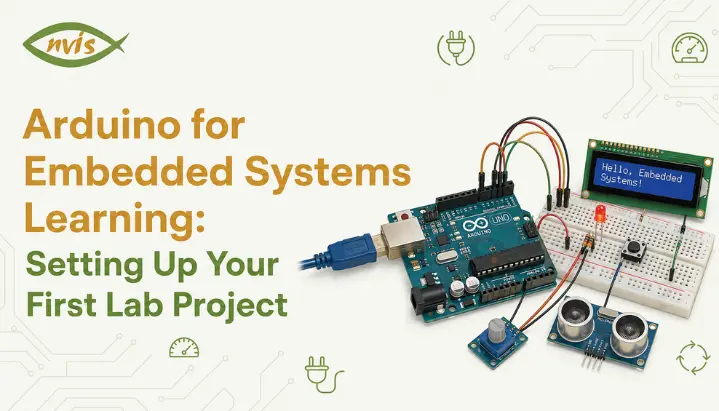
    Arduino for Embedded Systems Learning: Setting Up Your First Lab Project

    TL;DR

    1. This blog is for ECE, EEE, and CSE students, freshers, and exam aspirants who want to understand how an Arduino embedded system works and set up their first hands-on lab project.
    2. Arduino board itself is more accurately described as an embedded development platform.
    3. A proper Arduino embedded system setup needs the right board, Arduino IDE, correct driver installation, and one working baseline project before adding sensors.
    4. A worked numerical example on LED resistor calculation and PWM duty cycle shows how classroom formulas map directly onto real Arduino code.
    5. Building even one solid Arduino project strengthens GATE, SSC JE, and RRB JE embedded systems answers, and gives freshers something concrete to show in interviews at PSUs and private embedded companies.

    Every electronics student eventually asks the same question. Is Arduino embedded system technology, or is it something separate that sits next to embedded systems in a textbook? The confusion is understandable because many courses introduce embedded systems through microcontrollers such as the 8051 or PIC, while practical labs may then introduce Arduino without clearly explaining how the two relate.

    This blog answers that question directly and then walks through setting up your first Arduino based embedded system lab project from scratch. You will learn what happens inside the board, how to install software correctly, and how to wire and code your first working circuit. Along the way, you will work through calculations useful for GATE and SSC JE-style questions, along with India specific career context that most tutorials skip entirely.

    By the end, you will have a working lab setup and a clear mental model of where Arduino fits in the broader embedded systems landscape.

    Also read,

    Is Arduino an Embedded System?

    Arduino boards are embedded development platforms based on microcontrollers, and they can be used to build embedded systems for specific tasks. Understanding the role of the Arduino board and its microcontroller helps clarify the difference.

    An embedded system is a combination of hardware and software designed to perform a specific function. For example, a washing machine contains a controller that manages functions such as wash cycles, drum movement, and alerts. It is designed for a dedicated purpose rather than general-purpose computing.

    An Arduino board contains a microcontroller that provides the processor, memory, and input-output capabilities required to control connected hardware. On the classic Arduino Uno, the microcontroller is the ATmega328P. When a program is uploaded to the board and components such as sensors, LEDs, or motors are connected, the Arduino can be used to build an embedded system.

    However, an Arduino board is more accurately described as an embedded development platform built around a microcontroller. It provides a ready-made hardware and software environment that simplifies the development of embedded applications, particularly for beginners and students.

    Therefore, Arduino is best understood as a development platform used to create and learn embedded systems, rather than as a separate category that competes with embedded systems. It allows users to work with real microcontroller hardware without designing a custom circuit board from the beginning.

    Arduino vs Traditional Embedded Systems Development

    Once you understand Arduino as an embedded development platform, the next useful question is how it compares to the traditional route of embedded systems learning.

    In a conventional bare-metal workflow, you may program an 8051 or PIC directly using C or assembly, configure peripherals through registers, and use a programmer or debugger to load and test the firmware, configure peripherals through registers, and use a programmer or debugger to load and test the firmware. This teaches you exactly what is happening at hardware level, but the learning curve is steep for a first year student.

    Arduino removes several of these early barriers. The board already has a USB interface, a voltage regulator, and a pre-loaded bootloader that lets you upload code with one click. Arduino IDE hides much of low level register configuration behind simple functions like pinMode and digitalWrite. You still write in C or C++, so programming logic you learn transfers directly to professional embedded work later.

    This is why Arduino can be a useful starting point before moving to platforms such as STM32 or bare-metal AVR programming. You get real embedded hardware experience quickly, then dig deeper into register level control once fundamentals are solid.

    AspectArduino DevelopmentTraditional Bare Metal (8051/PIC)
    Programming languageC/C++ with simplified functionsC or Assembly with direct register access
    Upload methodUSB, one click uploadExternal programmer/burner required
    Learning curveGentle, beginner friendlySteep, needs hardware register knowledge
    Cost to startLow, single board around Rs 500 to Rs 900Board plus separate programmer needed
    Best suited forBeginners, rapid prototyping, hobby and lab projectsStudents learning register level architecture, production design
    Industry relevancePrototyping, IoT, hobbyist and academic projectsAutomotive, industrial, and safety critical production systems

    What You Need for Your First Arduino Embedded System Setup?

    Before touching any code, gather physical components. A cluttered or incomplete lab setup is the most common reason first projects fail.

    For a basic arduino embedded system setup, you need an Arduino Uno board, which is the most widely supported and documented option for beginners. You also need a USB cable, typically USB Type B on the original Uno, to connect the board to your laptop. A breadboard and a small set of jumper wires let you build circuits without soldering. Finally, keep a few basic components on hand, an LED, a 220 ohm resistor, and a push button, since almost every early tutorial uses these.

    Budget wise, a genuine Arduino Uno costs more, but clone boards using the same ATmega328P chip are widely available in India through electronics markets like Lamington Road in Mumbai, SP Road in Bengaluru, or online sellers, usually priced between Rs 400 and Rs 700. For a first lab project, a reputable Arduino-compatible clone can be a cost-effective option, although USB interfaces, component quality, and driver requirements can vary between boards.

    Software wise, you only need Arduino IDE, which is free and available for Windows, macOS, and Linux. There is no need for a separate compiler or an external programmer device, which is one of the biggest practical advantages Arduino offers over other microcontroller platforms.

    Installing and Configuring Arduino IDE

    With hardware in hand, the next step is getting your development environment ready. This is where many beginners get stuck, usually on driver installation rather than software itself.

    Download Arduino IDE from the official Arduino website and install it using the standard installer for your operating system. Once installed, connect your Arduino board to your computer using USB cable. Windows will often detect a genuine Arduino automatically, although driver or USB-port issues can still prevent recognition. Clone boards often use a CH340 USB to serial chip instead of the original chip, and Windows sometimes needs a separate CH340 driver installed manually before the board is recognized.

    After installation, open Arduino IDE and go to Tools, then Board, and select Arduino Uno from the list. Next, go to Tools, then Port, and select the COM port your board appears under. On Windows this typically looks like COM3 or COM4. On Linux or macOS, it usually appears as something like /dev/ttyUSB0 or /dev/cu.usbmodem.

    To confirm everything works, open File, then Examples, then 01.Basics, then Blink. Click the checkmark icon to compile code, then click the arrow icon to upload it. If the onboard LED starts blinking once every second, your Arduino embedded system setup is complete and ready for real projects.

    Your First Real Project: LED Control with a Push Button

    Blinking built in LED confirms your setup works, but it does not teach interaction. A slightly more meaningful first lab project is controlling an LED using a push button, since it introduces both digital input and digital output in one circuit.

    Build circuit by connecting LED’s longer leg through a 220 ohm resistor to digital pin 13, and shorter leg to GND. Connect one leg of the push button to digital pin 2, and the other leg to GND. Using INPUT_PULLUP mode in code avoids the need for an external pull up resistor on button, which simplifies wiring for a first attempt.

    const int buttonPin = 2;

    const int ledPin = 13;

    int buttonState = 0;


    void setup() {

    pinMode(ledPin, OUTPUT);

    pinMode(buttonPin, INPUT_PULLUP);

    }


    void loop() {

    buttonState = digitalRead(buttonPin);


    if (buttonState == LOW) {

    digitalWrite(ledPin, HIGH);

    } else {

    digitalWrite(ledPin, LOW);

    }

    }


    Here is what happens line by line. setup function configures pin 13 as an output for LED and pin 2 as an input with its internal pull up resistor enabled. Inside the loop, digitalRead constantly checks the button’s state. Because of the pull up configuration, the pin normally reads HIGH, and pressing the button pulls it to LOW by connecting it to ground. When code detects LOW, it turns the LED on, and otherwise keeps it off.

    This project matters more than it looks. It demonstrates a core embedded systems loop of reading an input, processing a condition, and driving an output, which is exactly the pattern used in far more complex systems, from an elevator controller to an EV battery management system.

    Worked Example LED Resistor and PWM Calculation

    GATE and SSC JE questions on embedded systems often test whether you can apply basic circuit laws inside a microcontroller context, not just recall definitions. Here is a worked example that combines both.

    Problem: An LED with a forward voltage of 2V and a required forward current of 15mA is connected to an Arduino digital pin that outputs 5V. Calculate the required resistor value. Then, if this LED is dimmed using PWM with a duty cycle of 40 percent, calculate its average voltage across the LED.

    Step 1: Resistor calculation using Ohm’s Law

    The resistor must drop the difference between supply voltage and LED’s forward voltage.

    Voltage across resistor = Supply voltage − LED forward voltage

    = 5 V − 2 V

    = 3 V

    Resistance = Voltage across resistor divided by required current Resistance = 3V divided by 0.015A = 200 ohms

    Since 200 ohm is not a standard resistor value, the nearest standard value, 220 ohm, is used in practice, which slightly reduces current for safety margin.

    Step 2: Average voltage under PWM

    PWM does not change peak voltage. Instead, it switches pins on and off rapidly, and PWM controls LED brightness by rapidly switching the Arduino output between 0V and 5V. The duty cycle determines the proportion of time the LED is powered during each cycle. This proportion is called duty cycle.

    For a simplified PWM calculation, the average Arduino output voltage is:

    Average output voltage = Duty cycle × Supply voltage

    = 0.40 × 5 V

    = 2 V

    This means at 40 percent duty cycle, LED experiences an effective average voltage of 2V, which is why it appears noticeably dimmer than at full brightness, even though actual pin voltage is still switching between 0V and 5V.

    This type of numerical combines basic Ohm’s Law with the concept of PWM duty cycle, making it useful practice for electronics and embedded-systems fundamentals.

    India Specific Context for Arduino Skills

    Arduino experience by itself will not get you a government job, but concepts it teaches map directly onto how embedded systems are tested and used across Indian industry and PSUs.

    Organizations such as ISRO, DRDO, BEL, BHEL, and HAL recruit engineers for a range of electronics, electrical, control, embedded, and related technical roles. Arduino projects can provide an early foundation in concepts such as GPIO, sensors, control logic, and microcontroller programming, although production systems use more specialized hardware and development processes. An Arduino project can help students begin developing some of the underlying skills used in these fields. While these organizations use industrial-grade microcontrollers and stricter development processes in production, the underlying logic of reading sensors, applying control conditions, and driving actuators is conceptually similar to what a student learns by wiring an LED and a button to what a student learns by wiring an LED and a button.

    On the private-sector side, India’s electric-vehicle industry has created demand for engineers working on embedded systems for areas such as battery management, motor control, and vehicle electronics. Understanding microcontroller-based control systems provides a useful foundation because many EV subsystems rely on embedded control principles. Similarly, India’s Production Linked Incentive scheme for electronics manufacturing has pushed more companies toward in house embedded product design rather than only assembly work, increasing demand for engineers comfortable with hands-on microcontroller development.

    For freshers, a portfolio built around genuine Arduino projects, not just tutorials copied without understanding, signals to interviewers that you can move from theory to a working circuit. That single differentiator often matters more in interviews than which specific board or platform you used.

    GATE, SSC JE, and RRB JE Exam Relevance

    Microcontroller, digital-electronics, and interfacing concepts appear in some technical examination syllabi. Candidates should check the current official syllabus for the specific exam, and Arduino-based learning can reinforce some of the underlying concepts tested in these exams, even though the exams themselves may not mention Arduino by name.

    GATE ECE covers relevant digital-system, electronic, and computer-architecture concepts, while the exact treatment of microprocessors, microcontrollers, and interfacing depends on the current syllabus. Learning these concepts through Arduino can make the underlying hardware concepts easier to understand. GATE papers related to electronics and instrumentation cover several concepts that can be reinforced through hands-on microcontroller projects.

    For SSC JE Electrical preparation, Arduino can help students strengthen basic electronics and digital concepts through hands-on practice, although the exam syllabus should be followed directly for topic coverage. For RRB JE and other technical recruitment exams, the relevance of microcontroller and embedded concepts depends on the specific discipline and current syllabus rather than platform specific trivia.

    The practical advantage of having built even one working Arduino project is that abstract exam topics like ADC resolution, PWM duty cycle, or interrupt handling stop being memorized definitions and become things you have actually observed happening on a breadboard. This noticeably improves both recall speed during exam and confidence during any follow up viva or interview round.

    Career and Salary Outlook for Embedded Systems Engineers in India

    Embedded systems remains one of more stable and steadily growing career paths for ECE and EEE graduates in India, and starting with Arduino is a legitimate first step toward it.

    Freshers entering embedded roles typically start in the range of Rs 4 LPA to Rs 8 LPA at automotive component makers, semiconductor companies, and product engineering firms, with service based companies often on the lower end of that range and specialized product companies on the higher end. Engineers who qualify through GATE and are recruited by organizations such as DRDO for Scientist B positions can start at the Level-10 pay scale, with the basic pay listed at Rs 56,100, alongside strong long term growth and job security. With three to five years of experience, embedded engineers commonly move into the Rs 8 LPA to Rs 15 LPA range, and specialization in automotive embedded systems, particularly around AUTOSAR and CAN protocols for growing the EV and automotive sector, can push packages considerably higher.

    The field particularly rewards engineers who combine software skills like C and C++ with genuine hardware understanding, exactly the combination that hands on Arduino based learning builds from the very first lab session. As India’s semiconductor and EV manufacturing base expands under central government incentive schemes, demand for engineers who can comfortably move between code and circuit is likely to keep growing faster than supply of such talent.

    Conclusion

    Arduino is an embedded development platform built around a microcontroller and can be used to create real embedded systems. Treating it as a practical starting point for embedded learning helps you build fundamentals before moving to more advanced platforms. Setting up your first arduino embedded system lab project, from installing IDE correctly to wiring your first button controlled LED, teaches the basic pattern of reading an input, processing the result, and controlling an output that appears in many embedded systems you will encounter later, from industrial PLCs to EV battery controllers.

    Combine that hands-on foundation with exam specific numerical practice and India specific career context covered here, and you have a genuinely well rounded starting point, whether your goal is a GATE rank, a PSU interview, or your first embedded engineering job. Set up your board today, build button LED projects yourself, and treat every future circuit as one more step toward a stronger embedded systems foundation.

    FAQs

    Is Arduino considered a real embedded system or just a learning tool?

    An Arduino-based setup can function as an embedded system when the board, program, and connected hardware are designed to perform a specific task. It is also an excellent learning tool, but these two things are not contradictory, since the board itself contains a real microcontroller doing real embedded work.

    No prior programming experience is required. Arduino uses a simplified version of C/C++, and most beginners learn programming concepts alongside electronics concepts through guided projects like ones covered in this blog.

    Arduino Uno is a recommended starting board because it has a large amount of tutorials, community support, and compatible components, making troubleshooting far easier for a first time user compared to other boards.

    Underlying concepts, such as interfacing, memory, and input output handling, are the same. Arduino simply wraps these concepts in beginner friendly functions, while exam syllabus content often discusses them at a more theoretical or register level, which you can explore further once comfortable with Arduino basics.

    Yes, a well understood Arduino project demonstrates that you can translate theoretical embedded systems knowledge into a working circuit, which can give interviewers evidence that you can apply embedded concepts in practice. The depth of the project and your understanding of the design decisions generally matter more than the specific development board used.
    Yes, a well understood Arduino project demonstrates that you can translate theoretical embedded systems knowledge into a working circuit, which can give interviewers evidence that you can apply embedded concepts in practice. The depth of the project and your understanding of the design decisions generally matter more than the specific development board used.
    Tags: Arduino embedded systems

    IoT Microcontroller Projects for Engineering Students: From Sensor to Cloud

    TL;DR

    1. This blog is for engineering students, freshers, and GATE/SSC JE aspirants who want to understand what a microcontroller in IoT actually does and how to build a working sensor to cloud project from scratch.
    2. Many smart devices, such as fitness trackers and smart streetlights, rely on microcontrollers to sense, process, and respond to information.
    3. Choosing the right IoT development board depends on your project’s processing, connectivity, power, and peripheral requirements rather than simply following the most popular option.
    4. Building even one complete sensor to cloud project teaches skills directly relevant to GATE, SSC JE, RRB JE, and entry level embedded and IoT roles in India.

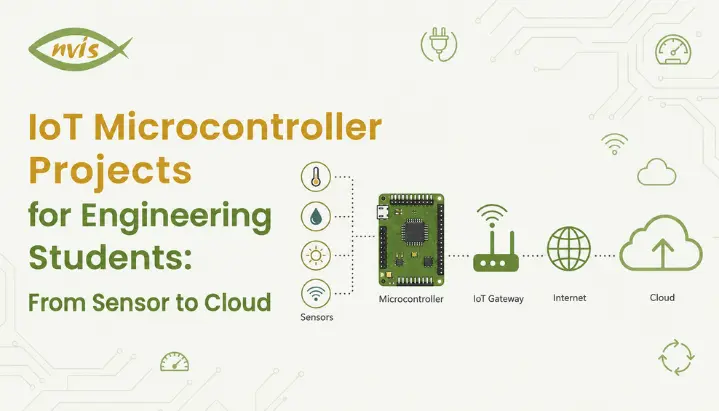
    Many smart devices, such as fitness trackers and smart streetlights, rely on tiny embedded chips to sense, process, and respond to information. In many iot microcontroller devices, this role is handled by a microcontroller. Understanding how microcontrollers work is therefore useful for engineering students interested in IoT and embedded systems. This blog explains what a microcontroller does for an iot device, how to choose one that’s best suited for your needs and build an entire iot project from sensors through cloud computing. At this stage, you will have an understanding of concepts and a working prototype that you can present and discuss during an interview.

    Also read,

    What Is a Microcontroller in IoT ?

    A microcontroller used in an IoT device is an integrated circuit that combines a processor core, memory, and peripherals such as GPIO, timers, communication interfaces, and sometimes ADCs on a single chip. It’s designed for performing particular controls and processing functions effectively instead of doing general-purpose computing tasks.

    A microcontroller is a component commonly used inside an embedded system and can act as the local controller for an IoT device. It can collect information like temperature, humidity, motion, gas sensor readings; process this information to respond as per programmed parameters. For instance, it may convert an electrical signal from a sensor into a temperature value, activate a fan when the temperature exceeds a set limit, and send the processed data to another device or cloud service using protocols such as MQTT or HTTP.

    The microcontroller is ideal for iot because it’s small, cheap and low power consuming. Unlike a typical microprocessor-based system, where memory and peripherals may be provided as separate components, a microcontroller integrates a processor, memory, and many peripherals on a single chip. It reduces total hardware needed for building an iot device.

    basic role of a microcontroller in an IoT system can therefore be summarized in three stages:

    1. Collect data: Read information from connected sensors.
    2. Process data: Convert and analyze sensor readings according to programmed logic.
    3. Control or communicate: Trigger an action locally or send processed information to another device, gateway, or cloud service.

    Thus, microcontrollers provide local intelligence that allows an IoT device to sense its environment, process information, and respond or communicate accordingly.

    Why Microcontrollers Matter So Much in IoT Development

    This is an interesting question to sit on for a while. Why not just use a regular computer chip for every IoT device. An intelligent drinking water bottle with a reminder function does not require an integrated processor like that found on gaming laptop computers.

    This is where the role of a microcontroller in IoT becomes clear. IoT gadgets are usually powered by batteries; they are tiny and need to last for months/years without any repairs. A microprocessor-based system typically requires more supporting hardware and may consume more power than a microcontroller-based design, making microcontrollers a practical choice for many simple, battery-powered IoT devices.

    The microcontroller solves it through being designed for that purpose. Many microcontrollers offer low-power sleep modes that can reduce current consumption significantly, while still providing enough processing capability for sensor logic, decision-making, and communication. Low power, low cost and just enough computing is what made IoT development explode the way it did over the past decade.

    Scalability is another important factor. Smart city projects may use ten thousand sensors on streetlights, water pipes and traffic lights. Deploying a full computer at every sensing point would often add unnecessary cost, power consumption, and complexity. Microcontrollers are practical for many mass-deployed IoT endpoints where low power, low cost, and local control are important, from college-level projects to industrial monitoring systems.

    What Is MQTT in IoT?

    MQTT (Message Queuing Telemetry Transport) is an efficient messaging protocol that is commonly used for communication between iot devices, applications, and servers. Publish-subscribe is an example of this communication pattern where a device publishes information on a particular topic that other computers/applications can subscribe for receiving this information.

    An MQTT-based IoT application uses an intermediary called a broker to receive messages from publishers and deliver them to subscribers. A sensor node like an iot device (microcontroller) publishes sensor data to a topic like home/livingroom/temperature. MQTT broker receives this message, then forwards it to every client that is subscribed for this particular topic. This allows publishers and subscribers to exchange information without communicating with each other directly.

    IoT applications are well suited to use of MQTT as they have low network traffic needs, low bandwidth requirements. It is useful to microcontrollers, battery-powered devices, and systems running on limited or unreliable networks. MQTT also has some small fixed protocol overhead, although the total message size depends on the topic, payload, and other protocol fields.

    For instance, an ESP32 based weather station can measure the temperature every ten seconds and publish the reading to home/livingroom/temperature. The MQTT broker receives this information, then sends it on to subscribers like an app and dashboard. Once the dashboard receives the published data, you can view the latest temperature readings online without repeatedly checking the sensor itself.

    Thus, MQTT is an effective means to communicate between iot devices/applications by publishing/subscribing/sharing information about sensors via a lightweight topic-based messaging protocol.

    How the Sensor-to-Cloud Pipeline Works

    Before touching any code, it helps to understand the full journey your data takes in a typical IoT development project. Picture posting a letter. You write it, drop it in a letterbox, it travels through a sorting system, and eventually reaches someone who reads it and reacts. IoT data follows the same logical journey.

    Stage 1: Sensing

    A sensor is a device that observes something in the physical world and converts it into an electrical signal. Sensors can provide either analog or digital output. For example, an MQ-2 and many soil-moisture sensors can provide analog readings, while the DHT22 communicates digitally with the microcontroller. The microcontroller reads the sensor output and converts or interprets it into useful values.

    Stage 2: Processing

    This is where microcontrollers in IoT earns its keep. When a sensor provides an analog voltage, the microcontroller can use its ADC, or analog-to-digital converter, to convert that voltage into a digital value that the program can process. Digital sensors such as the DHT22 do not require the same ADC conversion step. It then applies logic. Is the temperature too high? Is the soil too dry? Should an alert be triggered?

    Stage 3: Connectivity

    Once the microcontroller decides data is ready to be sent, it hands it off to a communication module. This could be a built-in Wi Fi radio, as in ESP32, or an external module connected to a microcontroller that lacks built-in wireless, like a classic Arduino Uno paired with an ESP8266.

    Stage 4: Cloud and Visualization

    MQTT or HTTP requests carry your data from microcontroller in IoT to cloud platform, where it gets stored, graphed, and made available for users to see on a dashboard or app. This is the part that makes the IoT feel magical, watching a live graph update on your phone because a sensor in your room just took a reading.

    Most competitor tutorials stop at “sensor sends data to cloud” without explaining how that handoff actually works. One common way to handle the communication between IoT devices, gateways, applications, and cloud services is MQTT. Other approaches, including HTTP and CoAP, are also widely used depending on the application.

    Choosing Right Microcontroller for Your IoT Project

    This is where many students get stuck. There are many development boards available, and different tutorials often recommend different options. The choice becomes easier once you know what your project actually requires.

    Ask three questions to start with. Is there a built-in wireless capability? Does it have to run for months on a small battery? Does the project require precise timing or real-time control, such as controlling a motor’s speed?

    If your requirement is “I need Wi-Fi and want to build a working prototype quickly,” an ESP32 is usually a strong choice for an IoT project. Wi-Fi, Bluetooth support is available, it has a dual core processor, and it is easy to use for beginners with Arduino IDE. This makes the ESP32 a popular choice for college-level IoT development projects.

    If your project prioritizes precise timing, real-time control, or advanced peripheral support and you are comfortable using a separate wireless module, an STM32 board can be a suitable choice. STM32 boards, many of which use ARM Cortex-M cores, offer a wide range of peripherals and strong real-time control capabilities. They are commonly used in motor control, industrial automation, and precision measurement applications, which matters for projects involving motor control or precision measurement.

    For beginners who want to learn microcontroller programming before moving into wireless projects, the Arduino Uno can be a straightforward starting point.

    MicrocontrollerBuilt in Wi Fi/BluetoothBest ForApprox. Price (India)Learning Curve
    Arduino UnoNoLearning basics, sensor interfacingRs 450 700Easiest
    ESP32Yes (Wi Fi + Bluetooth)IoT projects, cloud connectivity, home automationRs 350 600Easy to Moderate
    ESP8266 (NodeMCU)Yes (Wi Fi only)Budget IoT projects, simple sensor to cloud setupsRs 200 350Easy
    STM32 (Blue Pill/F4 series)No (needs external module)Motor control, industrial automation, precision projectsRs 300 1200Moderate to Advanced
    Raspberry Pi Pico WYes (Wi Fi)Python based IoT projects, custom I/O timingRs 500 700Easy to Moderate

    A quick clarification many students ask about: is a Raspberry Pi a microcontroller? No, a Raspberry Pi is a microprocessor based single board computer running a full operating system like Linux, while Raspberry Pi Pico is genuinely a microcontroller board. This distinction often shows up in exam questions and interviews, so it is worth remembering clearly.

    How to Calculate IoT Battery Life

    Numbers help to remember things better so let’s try out some math problems that may appear on an GATE/SSC JE exam and are also relevant for project design.

    Suppose you are building a soil moisture monitoring node using an ESP32 that will run on a 2000 mAh battery. Assume the ESP32-based node draws 160 mA during the active five-second period, and this active phase lasts 5 seconds every reading cycle. Between readings, it enters deep sleep mode, drawing only 10 microamps for the remaining 595 seconds of a 10 minute cycle.

    • Calculate the average current consumption first.
    • Active phase charge per cycle = 160 mA × (5/3600) h ≈ 0.222 mAh.
    • Sleep phase charge per cycle 0.01 mA multiplied by equals 0.00165 mAh.
    • Total charge per 10 minute cycle 0.222 plus 0.00165 equals approximately 0.2237 mAh.
    • Number of cycles in 24 hours 144 cycles, since there are 144 ten minute intervals in a day.
    • Total daily consumption 0.2237 x 144 = approximately 32.2 mAh per day.

    The theoretical battery life is approximately 62 days, assuming the battery can deliver its full rated capacity and the ESP32 consistently follows the stated current profile. In practice, battery life will be lower because of battery characteristics, voltage regulation losses, Wi-Fi behavior, sensor consumption, and temperature.

    This one calculation shows precisely how important deep sleep modes are for actual IoT development. Without sleep mode, the same ESP32 running continuously at 160 mA would drain a 2000 mAh battery in approximately 12.5 hours. That difference, 62 days versus half a day, is the entire reason power management is treated as a core skill in embedded systems and IoT interviews.

    How to Build a Sensor-to-Cloud IoT Project

    Let’s put everything together into a project structure you can actually build. We will use a temperature and humidity monitoring system, a common and genuinely useful starting project for IoT development.

    Components needed: An ESP32 board, a DHT22 temperature and humidity sensor, a breadboard, jumper wires, and a free ThingSpeak or Blynk cloud account.

    Step 1: Wire sensor. Connect DHT22’s data pin to a GPIO pin on ESP32, and connect its power and ground pins accordingly. This is the sensing stage of our pipeline.

    Step 2: Write reading logic. Using Arduino IDE, write code that reads temperature and humidity values from DHT22 every few seconds. This is the processing stage, where raw sensor data becomes usable numbers.

    Step 3: Connect to Wi Fi. Add code that connects ESP32 to your Wi Fi network using your network credentials. Without this step, the microcontroller has no way to reach the outside world.

    Step 4: Publish to cloud. Use the platform’s supported API or library to send your readings to a cloud channel or dashboard. Depending on the platform and implementation, the data may be transmitted using HTTP or MQTT.

    Step 5: Visualize data. Log in to your ThingSpeak dashboard and watch live graphs update as your sensor sends new readings. If you want to go further, set a threshold, such as an alert if humidity crosses 80 percent, and trigger an email or app notification.

    Once you have built this one project end to end, you understand the entire IoT development pipeline well enough to extend it into more advanced ideas, such as a smart irrigation system, an air quality monitor, or an energy consumption tracker for your hostel room.

    Microcontrollers in IoT and Industry Relevance in India

    For engineering students in India, microcontroller and IoT skills are relevant beyond classroom projects because they are used across embedded, industrial, automotive, and connected-device applications; it’s also relevant for job opportunities and government projects related to the electronics industry.

    India’s growth in electronics manufacturing, connected devices, and electric mobility has increased the relevance of hardware, firmware, embedded systems, and connectivity skills. IoT product companies may require engineers with skills in microcontroller programming, sensor interfacing, firmware development, and cloud connectivity.

    Organizations such as ISRO, DRDO, BEL, and BHEL work on systems involving embedded electronics, instrumentation, control, monitoring, and related technologies. The specific processors and architectures used vary by project. Although industrial and government systems use hardware and design practices far more sophisticated than a classroom ESP32 project, the basic engineering workflow sensing, processing, communication, testing, and validation remains relevant.

    In terms of the private sector, iot development has become one of its specializations among core electronics and computer science jobs done by big companies like automakers that develop connected vehicles and smart factories that use industrial iot for predictive maintenance.

    GATE, SSC JE, and RRB JE Exam Relevance

    If you are preparing for competitive exams, microcontroller and embedded systems concepts are particularly relevant to GATE Electronics and Communication Engineering and Instrumentation Engineering preparation.

    Microprocessor and microcontroller concepts are relevant to GATE preparation, particularly for students studying digital systems, computer organization, and related electronics topics. Check the latest official GATE syllabus for the exact topic coverage, and questions frequently touch on interfacing, memory organization, and input output handling. For GATE Instrumentation Engineering, microprocessor/microcontroller and interfacing-related topics should be studied according to the current official syllabus.

    For relevant technical exams such as GATE and RRB JE, students should review fundamentals such as microprocessor and microcontroller concepts, digital electronics, ADC/DAC, and interfacing where these topics are included in the applicable syllabus. Important areas may include basic microcontroller architecture, differences between microprocessors and microcontrollers, ADC/DAC characteristics, and fundamental embedded-system concepts, difference between microprocessors and microcontrollers, ADC and DAC characteristics, and fundamental embedded system concepts. These questions are usually conceptual rather than heavily numerical, which means a strong grasp of definitions and practical understanding, exactly what this blog has built so far, goes a long way.

    A practical exam strategy: do not just memorize that a microcontroller has a CPU, RAM, ROM, and I/O on a single chip. Understand why that integration matters, as we covered in earlier sections, because exams increasingly frame questions around application and reasoning rather than pure recall.

    Career and Salary Guidance for Aspiring IoT Engineers

    Once you have a working IoT development project under your belt, it becomes a genuine asset for placements and interviews, not just a lab submission.

    Freshers entering IoT and embedded roles in India can typically expect starting salaries in the range of Rs 3 to 8 LPA, depending on the company, your project portfolio, and your grasp of both hardware and cloud side skills. Roles at larger product companies and multinational corporations tend to sit at the higher end of this range, especially for candidates who can demonstrate hands-on project experience rather than just theoretical knowledge.

    As you gain experience, typically in the 4 to 7 year range, with experience, professionals who combine embedded development with cloud integration, IoT protocols, security, or industrial IoT skills may qualify for more advanced roles with higher compensation. Specializing further into edge computing, firmware security, or industrial IoT tends to open even higher paying senior roles later in a career.

    For students specifically, practical advice is this: a single well documented sensor to cloud project, complete with a GitHub repository, a short demo video, and a clear explanation of your design choices like power calculation we walked through earlier, often matters more in interviews than a long list of half finished project titles on a resume.

    Conclusion

    Understanding a microcontroller in IoT is really about understanding one small but powerful idea: a tiny, efficient chip can sense the physical world, make sense of that data, and connect it to the cloud, all while running on a fraction of the power a regular computer would need. We walked through what a microcontroller actually does, why it matters for iot microcontroller at scale, how data travels through sensor to cloud pipeline using protocols like MQTT, and how to choose the right board for your specific project. We also worked through a real battery life calculation and a complete project structure you can build today.

    The best next step is not to read another article, it is to order a DHT22 sensor and an ESP32 board, and build the project we outlined above. Once you see your own sensor data update live on a cloud dashboard, IoT development stops being an abstract topic and becomes a skill you genuinely own. Share your first project results or questions in comments, and start building.

    FAQs

    A microcontroller in IoT is a small, self-contained chip that reads data from sensors, processes it, and either acts on it directly or sends it to the cloud through a communication module. It combines a processor, memory, and input output pins on a single chip, making it ideal for compact, battery powered IoT devices.

    ESP32 is generally the best starting point because it has built in Wi Fi and Bluetooth, works with beginner friendly Arduino IDE, and is affordable enough for student projects. If you want to first understand microcontroller programming without wireless features, an Arduino Uno is a solid teaching board before moving to ESP32.

    No, a standard Raspberry Pi is a microprocessor based single board computer that runs a full operating system like Linux. Raspberry Pi Pico, however, is genuinely a microcontroller board, and this distinction is worth remembering for exams and interviews.

    MQTT is a lightweight publish subscribe protocol that lets a microcontroller in IoT send data to a specific topic, which any subscribed application or dashboard can instantly receive. It is designed for constrained networks, with relatively low protocol overhead and support for lightweight messaging, which makes it ideal for battery operated IoT devices.

    Yes, Microcontroller and embedded-system concepts are relevant to some GATE and technical-exam syllabi, but the exact coverage varies by examination and year. Always check the current official syllabus for the exam you are preparing for. Questions may cover areas such as microcontroller architecture, ADC/DAC characteristics, and microprocessor-versus-microcontroller differences.

    Freshers can typically expect starting salaries between Rs 3 and 8 LPA in IoT and embedded roles in India, depending on company and strength of their project portfolio. Salaries tend to grow significantly with experience, particularly for engineers who develop strong cloud integration and protocol expertise like MQTT and CoAP.

    Tags: microcontroller in iot

    ARM Cortex M Microcontrollers Explained: Architecture for Embedded Engineering Students

    TL;DR

    1. This blog is for ECE, EEE, and CSE students, freshers, and GATE/SSC JE/RRB JE aspirants who want to understand what an ARM Cortex M microcontroller actually is and how its architecture works, from first principles.
    2. This blog explains what Arm means in the context of microcontroller design and examines the Cortex-M architecture step by step, helping beginners understand the role of each major component rather than simply memorizing terminology.
    3. This post builds concepts step by step: what ARM in a microcontroller means, how core, registers, memory, and NVIC fit together, and how M0, M3, M4, and M7 variants differ in real numbers.
    4. A worked numerical example on interrupt latency shows exactly how to calculate real time response time, the kind of calculation GATE and SSC JE papers expect you to solve.
    5. The post closes with India specific employer and salary context, exam relevance, and a comparison table so you leave with both conceptual clarity and exam ready facts.
    ARM Cortex-M processors are used in many embedded products, including automotive control systems, fitness trackers, and other connected devices. Nowadays, it has become necessary for all embedded systems related jobs in India to understand the architecture of ARM Cortex M microcontroller, which is relevant to microcontroller, processor, interrupt, and computer-architecture concepts tested in engineering and technical examinations. This blog provides an explanation of the meaning of ARM in the context of microcontroller design, examines the Cortex M architecture, one by one, and illustrates the differences between the M0, M3, M4 and M7 cores with real specifications, not with marketing-speak. By the end of this article, you should be able to understand the major sections of a Cortex-M microcontroller datasheet and interpret common architectural terms.

    Also read,

    What Is ARM in Microcontroller?

    Arm develops processor architectures and processor IP, including the Cortex family of CPU cores. Cortex-M is its microcontroller-oriented processor profile. Arm is not a microcontroller manufacturer. Instead, it licenses its architectures and processor IP to semiconductor companies, which integrate Arm-based CPU cores with memory and peripherals to create complete microcontrollers and SoCs.These companies combine Arm processor cores with flash, RAM, timers, GPIO, ADCs, communication interfaces, and other hardware to create complete microcontrollers and SoCs.ARM processors are based on the RISC (Reduced Instruction Set Computing) design philosophy. RISC is made up of a rather limited number of simple instructions that are executed efficiently and quickly. RISC processors usually have fewer and simpler instructions than the traditional CISC processors with their longer, more complex instructions, and the execution is more efficient and processor design is more streamlined.This architecture can be seen in microcontrollers such as the ARM Cortex-M family of processors, including the Cortex-M0, Cortex-M3, Cortex-M4, Cortex-M7 and new Cortex M processors. For example, a Cortex-M4-based microcontroller can provide substantially higher computational performance than many older 8-bit MCUs because it combines a 32-bit architecture with a more capable instruction set, higher processing throughput, and, in many implementations, higher clock frequencies.So, if someone mentions the ARM in the context of a microcontroller, it is usually referring to the architecture or core, and the entire microcontroller is manufactured by a chip maker who adds memories, peripherals, and other hardware to the ARM core.

    Why Cortex M Family Exists ?

    Before Cortex-M became widely adopted, embedded systems commonly ranged from low-cost 8-bit MCUs to more capable 32-bit processors and microcontrollers. Before Cortex-M became widely adopted, embedded systems ranged from low-cost 8-bit and 16-bit microcontrollers to more capable 32-bit processors and microcontrollers. Lower-end MCUs were suitable for simple control tasks, while more capable 32-bit devices were used when applications required greater processing performance, memory, connectivity, or operating-system support. But in between, Arm targeted applications that needed more computational capability than traditional low-end MCUs could comfortably provide, while still requiring low cost and low power consumption.ARM’s response was the Cortex M series. M is for Microcontroller profile, one of three ARM processor profiles, the other two are Cortex A (smartphones and laptops) and Cortex R (real time systems such as automotive braking controllers). Cost-sensitive, predictable and interrupt-driven embedded systems, devices that require predictable and timely responses to real-world events, were the target of Cortex M, which was designed for these applications.This one design choice is the cause of nearly all others in architecture.Many Cortex-M systems combine efficient interrupt handling with low-power features to support responsive operation in resource-constrained embedded applications.

    Breaking Down ARM Cortex M Microcontroller Architecture

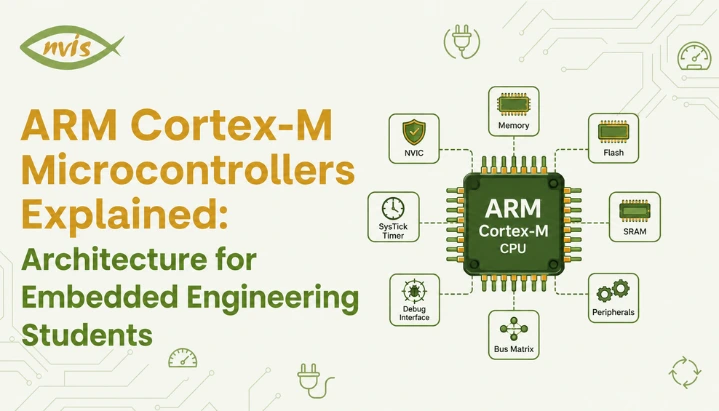
    An ARM Cortex M microcontroller is not one single block. It is a small collection of cooperating units, each with a clear job. Picture a compact factory floor: a supervisor giving instructions, workers carrying out tasks, a filing cabinet of short term notes, a warehouse of long term records, and an alarm system that interrupts everyone the moment something urgent happens. That is roughly how pieces of a Cortex M microcontroller work together.

    Processor Core: Supervisor

    processor core is the part that actually executes instructions. It contains an Arithmetic Logic Unit, which performs calculations, along with control logic that decides what happens next. Every instruction your embedded C code compiles down to eventually passes through this core.

    Registers: Filing Cabinet on Desk

    Registers are small, fast storage locations built into the processor and used to hold values that the CPU needs frequently. A Cortex-M core provides general-purpose registers R0 to R12. The SP (Stack Pointer) points to the current stack location, the LR (Link Register) is commonly used to hold a return address, and the PC (Program Counter) holds the address of the instruction being executed or fetched, depending on the processor state. There is also a Program Status Register (PSR) that stores flags like zero, carry, overflow, and negative, which the processor checks when making decisions such as branching on a comparison.

    Memory: Flash for Long Term Storage, SRAM for Working Space

    Flash memory is where your compiled firmware lives permanently. It does not lose data when power is removed, which is why your microcontroller boots up running the same program every time. SRAM, on other hand, is fast but volatile working memory used for variables, stack, and runtime data while a program executes. If Flash is a warehouse where finished records are archived, SRAM is a desk where you actively work on today’s task.

    Bus Architecture: Delivery Routes

    Cortex-M implementations use bus interfaces that can provide separate instruction and data paths, with the exact bus structure depending on the Cortex-M core and the microcontroller implementation. This separation can allow instruction fetching and data access to proceed concurrently. However, the actual performance depends on the Cortex-M core, bus structure, memory system, and microcontroller implementation.

    NVIC: How Cortex M Handles Interrupts So Well

    When it comes to a characteristic of Cortex M architecture, there is one thing that stands out: Nested Vectored Interrupt Controller (NVIC). The interrupt is just a signal to the processor to stop doing what it’s doing and come to attention immediately, and process something else, like a button click, a sensor reading above or below a threshold, an incoming UART byte, etc.Now suppose you were in the kitchen and the telephone rang. The entire recipe is not completed at once. You identify where you paused, respond and then cook from the same point. The Cortex-M exception-handling mechanism automates much of this behavior in hardware. When an interrupt or exception is taken, the processor automatically saves a defined exception stack frame, transfers execution to the corresponding handler, and restores the interrupted context when exception return occurs. The NVIC specifically manages interrupt prioritization, pending status, and interrupt delivery. This removes the need for software to manually save and restore the standard exception-frame registers. No line of manual register saving logic in your code.When an interrupt fires, The Cortex-M processor automatically saves the standard exception stack frame, enters the Interrupt Service Routine (ISR), and restores the interrupted context when the ISR returns through the exception-return mechanism.NVIC supports programmable interrupt priorities, allowing a higher-priority interrupt to preempt a lower-priority handler when the architecture and current interrupt state permit it. This is called nesting and the “Nested” in NVIC is derived from that. Tail chaining is another feature of Cortex M processors, the idea is Tail-chaining allows a pending exception to be serviced directly after another ISR without performing a full exception return and then a separate exception entry sequence, reducing interrupt-handling overhead.

    Worked Numerical Example: Calculating Interrupt Response Time

    This is a useful example of converting processor clock cycles into real-time latency, a calculation that can help with microcontroller and digital-system timing problems so it is worth working through carefully.Problem: A Cortex M3 based microcontroller runs at a clock speed of 72 MHz. For this simplified example, assume an interrupt latency of 12 clock cycles from interrupt recognition to execution of the first ISR instruction.  If ISR itself takes 150 clock cycles to complete, calculate total time in microseconds from interrupt assertion to ISR completion.Step 1: Find the time period of one clock cycle.Clock speed = 72 MHz = 72 × 10⁶ cycles per secondTime per cycle = 1 / (72 × 10⁶) seconds = 0.01389 microseconds (approximately)Step 2: Find total number of clock cycles involved.Total cycles = interrupt latency + ISR execution time = 12 + 150 = 162 cyclesStep 3: Multiply total cycles by time per cycle.Total time = 162 × 0.01389 microseconds = 2.25 microseconds (approximately)So the entire interrupt handling process, from interrupt signal being raised to ISR finishing its job, takes just about 2.25 microseconds on this Cortex M3 system. An older 8-bit architecture may have a different interrupt-entry sequence and instruction timing, so its latency can be higher or lower depending on the specific MCU. The key point is that Cortex-M provides a standardized and efficient hardware mechanism for exception entry and interrupt handling because the processor may need to finish a multi cycle instruction before it can even begin saving context. This kind of predictable and efficient interrupt handling is one reason Cortex-M devices are widely used in real-time applications such as motor control and sensor processing.

    Cortex M0, M3, M4, and M7: How Family Actually Differs

    Every Cortex M core shares the same basic philosophy, but they are tuned for different jobs, the same way a scooter, a hatchback, and a highway coach are all vehicles built for very different journeys. Here is how most widely used variants actually compare, using real specifications rather than vague labels like “better” or “faster.”
    FeatureCortex M0/M0+Cortex M3Cortex M4Cortex M7
    ArchitectureARMv6 MARMv7 MARMv7 MARMv7 M
    Pipeline stages2336 (superscalar)
    DSP instructionsNoNoYesYes
    Hardware FPUNoNoOptional (single precision)Optional (single and double precision)
    Hardware divideNoYesYesYes
    Typical use caseSimple sensors, basic controlGeneral embedded controlMotor control, audio, signal processingHigh speed real time processing, advanced HMI
    Example MCUSTM32F0 seriesSTM32F1 seriesSTM32F4 seriesSTM32H7 series
    In practice, it’s simple to see when you look at it like this. Cortex M0 and M0+ are designed to be used in the most power and cost sensitive applications, including simple sensors and basic consumer electronics, where the extent of battery life is more critical than raw performance. Cortex-M processors integrate the NVIC into their interrupt architecture, with capabilities varying across generations. The Cortex-M family provides a 32-bit processing platform suitable for applications ranging from simple control tasks to more demanding embedded workloads. Cortex-M4 adds DSP-oriented instructions, while an FPU is available in FPU-equipped implementations, explaining its predominance in applications such as motor control algorithms or audio processing that rely heavily on mathematical operations. The performance of Cortex-M7 uses a 6-stage dual-issue superscalar pipeline, allowing up to two instructions to be issued per cycle under suitable conditions, thus providing headroom for high demanding applications such as high resolution display control or high end signal processing, where the M4 may have begun to be limited.

    ARM Cortex M in Indian Embedded Industry

    ARM Cortex M is no ordinary study content for engineering students in India. It’s a family of chips that are actually installed in products created by companies you can expect to interview with. The STM32 series, one of the most popular and utilized Cortex M families in Indian engineering colleges, drives projects ranging from student project boards to industrial controllers.Embedded engineers are recruited in the government tied and defence organizations such as ISRO, DRDO, BEL and HAL for working with microcontrollers based on ARM for subsystems in satellite, radar and communication equipment. The initial roles for freshers in embedded systems are around 3.5 to 6 LPA in an organization such as Bosch, Continental, L&T Technology Services, Tata Elxsi, Sasken, Honeywell and NXP and with 2-3 years experience in a particular field, the pay scale can be from 8 to 14 LPA. Generally, Engineers with fresher experience are hired for 3.5 to 6 LPA in hubs such as Bangalore and increased to 7 to 12 LPA after two years, and for jobs in the automotive and RTOS specialization, they are paid 12 to 20 LPA.With India’s expanding electronics and semiconductor ecosystem, embedded and firmware skills are receiving increasing attention. Engineers who understand microcontroller architecture at a deeper level can have an advantage over candidates whose experience is limited to using high-level development environments such as the Arduino IDE. Embedded positions in the automotive industry, such as those for engine management systems, battery management systems, and in general when dealing with embedded systems, can pay between 7 and 35 LPA, depending on experience, and Automotive embedded roles can offer strong compensation, particularly for engineers with experience in areas such as AUTOSAR, functional safety, embedded C/C++, automotive protocols, and RTOS-based development.

    GATE, SSC JE, and RRB JE Exam Relevance

    Microprocessor and digital-system concepts are relevant to GATE ECE preparation, but the exact syllabus classification and question patterns should be checked against the current official syllabus, and questions on interrupt handling, register architecture, and instruction execution timing are common numerical problem types. Microprocessor, microcontroller, and digital-system concepts have appeared in GATE over the years, but their frequency and marks vary from paper to paper, and Questions may use concepts that are also relevant to modern Cortex-M-based systems, even when the specific processor architecture is not named.For SSC JE and RRB JE electronics and electrical papers, microcontroller architecture questions tend to focus on conceptual understanding: what registers do, how interrupts are prioritised, and practical difference between RISC and CISC design. A worked example earlier in this post, calculating total interrupt response time from clock speed and cycle counts, is a template you can reuse directly, since these exams frequently rephrase the same underlying calculation with different clock speeds and cycle counts.A practical exam strategy is to master register sets (R0 to R12, SP, LR, PC, PSR) cold, understand NVIC’s priority and nesting behaviour conceptually, and practice cycle to time conversions until they become automatic. These three areas cover several important microcontroller-architecture concepts that are useful for GATE, SSC JE, and RRB JE preparation.

    Building a Career Around ARM Cortex M Skills

    If you are early in your engineering degree, the most useful thing you can do is get hands on with an actual Cortex M development board rather than only reading about architecture. STM32 Nucleo boards and similar Cortex M4 based development kits are inexpensive, well documented, and directly relevant to what Indian embedded employers expect from freshers.ECE engineers in embedded systems and VLSI roles typically reach 10 to 18 LPA at mid level, with three to five years of experience, and embedded specific specialisation tends to compound this further. Semiconductor firmware roles working close to silicon level, including Cortex M based firmware, are among higher paying segments within embedded systems, with mid to senior engineers at semiconductor companies earning 15 to 35 LPA.A skill progression that consistently works for Indian embedded freshers looks like this: start with Embedded C fundamentals, move to bare metal Cortex M programming using register level code before relying entirely on vendor libraries, then layer in an RTOS like FreeRTOS once fundamentals are solid. Employers consistently value candidates who understand what is happening underneath the abstraction layer, not just candidates who can call a library function.

    Conclusion

    ARM Cortex M microcontrollers earned their dominant position in embedded systems by solving a real problem:delivering 32-bit processing capabilities while targeting the cost and power constraints of many embedded applications with an interrupt handling system fast enough for real time applications. Understanding this architecture means going beyond memorising terms like NVIC or PSR and instead grasping why each piece exists and how they work together, from the register set that provides the CPU with fast access to frequently used values, to bus architecture that lets instruction fetch and data access happen in parallel.For Indian engineering students, this knowledge pays off twice. It builds conceptual foundations that GATE, SSC JE, and RRB JE numerical questions test directly, and it builds practical skill sets that embedded employers, from STMicroelectronics and Bosch to ISRO and DRDO, actually hire for. Start with a Cortex M4 development board, work through register level programming before jumping to abstraction libraries, and practice interrupt timing calculations until they feel automatic. That combination is what turns textbook knowledge into an actual embedded systems career.

    FAQs

    Arm is a company that develops processor architectures and CPU designs and licenses them to semiconductor companies, who then build complete microcontrollers around that design by adding memory, timers, and peripherals. When people ask what ARM is in microcontroller terms, they are really asking about processor core design inside the chip, not the finished product itself.

    Cortex-M is Arm’s microcontroller-oriented processor profile, while Arm also develops Cortex-A and Cortex-R processor families for other types of systems. ARM also offers Cortex A profile for application processors used in smartphones and Cortex R profile for real time systems, so Cortex M specifically refers to the microcontroller focused branch of ARM’s designs.

    An ARM M4 microcontroller adds DSP instructions and an optional Floating Point Unit that a Cortex M3 does not have, which matters for signal processing and motor control projects. For pure learning purposes, either core teaches the same fundamental register and interrupt concepts, so beginners can start with whichever development board is more easily available.

    Cortex M processors balance computing power, low power consumption, and cost in a way few alternatives match, which is exactly what battery powered IoT sensors need. scalability across M0 to M7 variants also means a single ecosystem of tools and knowledge covers products ranging from simple sensors to advanced edge devices.

    GATE ECE includes microprocessor, digital-system, and computer-architecture concepts. The exact processor families and question emphasis vary across papers and years, but interrupt handling, register architecture, and cycle-time calculations are useful concepts to understand, register architecture, and cycle time calculations, all core Cortex M topics, are directly testable regardless of which specific processor family a question references. Practicing clock cycle to time conversion shown in this post prepares you for this question type regardless of exact architecture named.

    Embedded C is the dominant language for Cortex M firmware development in industry, often supplemented with a small amount of ARM assembly for startup code or highly time critical routines. C++ is increasingly used as well, particularly in larger projects that use an RTOS like FreeRTOS or Zephyr.

    STMicroelectronics, Bosch, Continental, L&T Technology Services, Tata Elxsi, Sasken, and NXP are among private companies hiring for Cortex M based embedded development, alongside PSUs and defence organisations like ISRO, DRDO, BEL, and HAL. Compensation varies by employer, location, role, and experience, with specialized skills such as RTOS and automotive protocols potentially improving a candidate’s opportunities.

    Tags: ARM in Microcontrolle

    Motor Control Using Microcontroller: PWM, H Bridge and Interfacing Basics

    TL;DR

    1. This blog is for ECE, EEE, and mechatronics students, freshers, and GATE or SSC JE aspirants who want to understand motor control using microcontroller techniques from ground up.
    2. Many motor-control applications need control over two key parameters: speed and direction. A microcontroller cannot supply current a motor needs, so it relies on PWM signals and an H bridge circuit to do its job safely.
    3. PWM (Pulse Width Modulation) controls motor speed by rapidly switching power on and off, while H bridge controls direction by reversing current flow through the motor.
    4. The term “motor control” is also used in industrial electrical systems, where a Motor Control Center (MCC) panel controls and protects multiple motors. This is different from microcontroller-based motor control and is explained later for clarity.
    5. Understanding this topic well can open doors to embedded systems, robotics, EV, and industrial automation roles at companies and PSUs like ISRO, DRDO, BHEL, and Tata Motors, along with strong marks in GATE and SSC JE papers.

    Motor control is an important part of many robotics, automation, embedded, and mechatronics projects. A microcontroller determines when to start a motor, how fast to spin it and in which direction, but it cannot do this on its own. It requires two concepts: Pulse Width Modulation (PWM) to control speed, and an H bridge circuit to control direction. This blog explains both concepts in plain english, goes over a worked numerical example and even clears up a common point of confusion between motor control with a microcontroller and a Motor Control Center (MCC) panel in industrial plants, both of which are frequently mentioned in electrical engineering courses and papers.

    Also read,

    Why Can’t a Microcontroller Drive a Motor Directly?

    Imagine a microcontroller pin as a small control switch. It can send a signal to tell another circuit when to turn on or off, but it cannot supply the large amount of current needed to drive a motor directly. A motor driver acts as the power-handling stage between the microcontroller and the motor. The microcontroller sends a 3.3V or 5V control signal to the driver, while the driver handles the higher current required by the motor.

    A DC motor can draw a much higher current during startup than during normal operation because the motor initially has little or no back EMF. This startup or stall current can be several times the motor’s normal running current. When a motor is connected directly to a pin on a microcontroller, it is not being powered. You’re cooking your microcontroller.

    That is why a microcontroller-based motor-control system normally uses a motor-driver or power-switching stage between the microcontroller and the motor. Depending on the motor and required control, this stage may use an H bridge, half-bridge, MOSFETs, or another suitable driver circuit. PWM may then be used to control speed.

    What Is PWM and How Does It Control Motor Speed?

    Imagine you are filling a bucket using a tap that only has two positions: fully open or fully closed. You cannot set it to a gentle trickle. But if you open and close that tap very quickly, say open for 7 seconds and closed for 3 seconds, every 10 seconds, the bucket still fills up, just at 70 percent of tap’s maximum flow rate. That is the entire idea behind Pulse Width Modulation.

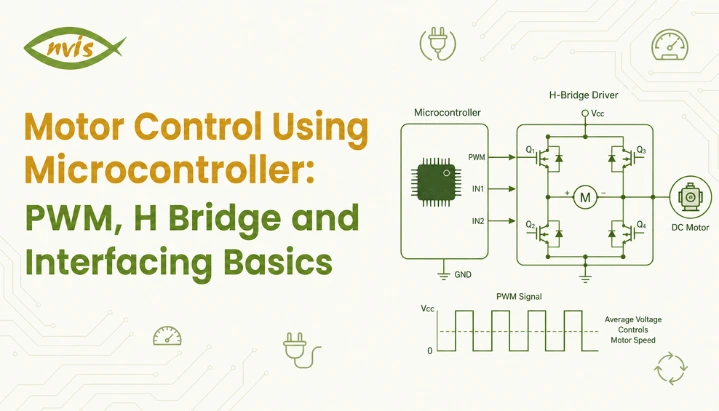
    PWM works by switching a digital output on and off at a fixed frequency, and the proportion of time it stays on during each cycle is called duty cycle. The motor does experience the individual switching pulses, but its electrical and mechanical dynamics prevent its current, torque, and speed from following each switching transition instantaneously. Because the motor’s electrical and mechanical characteristics smooth the switching waveform, PWM produces an average effect on motor current and torque. For basic calculations, the average applied voltage is often approximated as

    Vavg​=Vs​D.

    relationship is refreshingly simple:

    Average Voltage = Supply Voltage × Duty Cycle

    So if a 12V motor is driven with a 60% PWM duty cycle, the **average terminal voltage over a PWM cycle** is approximately 7.2V under ideal switching conditions. However, the motor’s actual speed will not necessarily be exactly 60% of its full-speed value because speed also depends on load, motor characteristics, back EMF, winding resistance, and the driver circuit. Increase the duty cycle and the motor will generally speed up under the same load. Decrease it and the motor will generally slow down. PWM switching can be much more efficient than using a linear voltage-control method, although the motor, switching devices, wiring, and driver still have power losses.

    Worked Numerical Example on PWM Duty Cycle

    This is a useful practice problem because it combines duty cycle, switching frequency, and average-voltage calculations that are relevant to power-electronics fundamentals.

    Question: A DC motor is rated for 24 V. It is being driven by a PWM signal at a switching frequency of 1 kHz with a duty cycle of 65%. Calculate the average voltage applied to the motor and the corresponding on-time of each PWM pulse.

    Step 1: Calculate average voltage. Average Voltage = Supply Voltage × Duty Cycle Average Voltage = 24V × 0.65 Average Voltage = 15.6V

    Step 2: Calculate total time period of one PWM cycle. Time Period (T) = 1 / Frequency T = 1 / 1000 Hz T = 1 millisecond (1 ms)

    Step 3: Calculate on time using duty cycle. On Time = Duty Cycle × Time Period On Time = 0.65 × 1 ms On Time = 0.65 ms (or 650 microseconds)

    So in every 1 millisecond cycle, the motor receives a full 24V pulse for 0.65 ms and 0V for remaining 0.35 ms,giving an average terminal voltage of 15.6V over each PWM cycle under ideal switching conditions. This single formula, average voltage equals supply voltage multiplied by duty cycle, is worth memorizing cold for exams, since this type of duty-cycle and average-voltage calculation is useful for power-electronics fundamentals and exam preparation.

    What Is an H Bridge and Why Does Direction Control Need One?

    Speed is only half a story. Most real applications, robots that reverse, wipers that go back and forth, elevators that go up and down, also need motors to spin in both directions. This is where the H bridge comes in.

    Picture four gates arranged in the shape of letter H, with a motor sitting across the middle bar of that H. In the basic forward-drive state, current flows from the positive supply through one high-side switch, the motor, and one low-side switch to the negative supply. If one diagonal pair of switches is turned ON, current flows through the motor in one direction. Turning that pair OFF and activating the opposite diagonal pair reverses the current through the motor, causing it to rotate in the opposite direction. That is the whole trick. No moving parts, no manually swapping wires, just electronically choosing which diagonal path gets activated.

    In practice, these “gates” are transistors or MOSFETs, and they are usually packaged into a ready made driver IC so students and engineers do not need to build a switching circuit from scratch. The most common ones you will encounter in a lab are L293D, L298N, and more modern TB6612FNG.

    Depending on the driver IC, a microcontroller may provide two direction-control signals along with a PWM or enable signal. The direction inputs determine the motor’s current path, while PWM controls the effective power delivered to the motor. Some driver ICs also provide a separate enable input for disabling the output stage.

    One Critical Warning: Shoot Through Current

    The high-side and low-side switches on the same half-bridge must not be turned on simultaneously. Doing so can create a low-impedance path directly across the supply, producing a large shoot-through current that can damage the switching devices. Proper drivers often use interlocking or dead-time control to prevent this condition. This is why H-bridge designs must prevent both switches in the same half-bridge from being ON simultaneously. Many dedicated drivers provide interlocking and dead-time internally; in other designs, the controller or firmware may need to ensure appropriate timing when switching states.

    Comparing Popular Motor Driver ICs for Microcontroller Projects

    Driver ICMotor ChannelsMax Current per ChannelMax VoltageTypical Use Case
    L293D20.6A (1.2A peak)36VSmall hobby robots, college mini projects
    L298N22A46VMedium robots, small conveyor models
    TB6612FNG21.2A (3.2A peak)15VCompact robotics, drone ground stations
    BTS7960143A27VHigh torque robots, e bike prototypes, EV mini projects

    L293D and L298N are still widely encountered in educational projects, although newer MOSFET-based drivers are generally more efficient and produce less voltage drop due to their low cost and widespread availability across Indian electronics markets like Lamington Road in Mumbai and SP Road in Bangalore. For applications requiring substantially more current, such as higher-power robotic platforms or some small vehicle prototypes, a higher-current driver such as a BTS7960-based module or another appropriately rated motor controller may be considered.

    Microcontroller Motor Control vs Motor Control Center Panel: Don’t Confuse Two

    Here is a genuine point of confusion for many students: “motor control” appears in two very different contexts in electrical and electronics engineering, and interviewers love to test whether you know the difference.

    Microcontroller motor control, everything covered above using PWM and H bridges,is commonly used to control small and medium DC motors through an appropriate driver or power stage, with motor voltage and current determined by the motor and driver requirements. It is the domain of embedded systems, robotics, and mechatronics.

    A Motor Control Center (MCC) panel, sometimes just called a motor control panel, is an entirely different piece of industrial equipment. It is a large enclosed assembly, often the size of a cupboard or bigger, containing multiple motor starters, circuit breakers, contactors, and overload relays, all sharing a common power bus. An MCC panel distributes and controls power for multiple industrial motors, often three-phase motors. In India, many low-voltage industrial systems operate around 415V AC, although actual system voltages and configurations vary by application.

    AspectMicrocontroller Motor ControlMotor Control Center (MCC) Panel
    ScaleSingle small motorMultiple large industrial motors
    Typical Voltage5V to 24V DC415V AC, 3 phase
    Core TechniquePWM and H bridge switchingContactors, starters, overload relays
    Where You’ll Find ItRobotics, embedded projects, dronesFactories, water treatment plants, power stations
    Who Designs ItEmbedded systems or electronics engineerElectrical engineer, panel design engineer

    Both are legitimately called “motor control,” and both are worth understanding, since your career could head in either direction depending on whether you gravitate toward embedded systems or industrial electrical design.

    Interfacing Basics: Connecting It All Together

    A typical motor control using microcontroller setup follows a consistent wiring pattern regardless of which microcontroller or driver IC you choose.

    The motor should normally be powered through the driver’s motor-supply path rather than directly from a microcontroller GPIO or regulator output. The motor supply should be selected according to the motor and driver requirements. Sharing grounds between microcontroller and motor’s power supply is essential, since both circuits need a common reference point for their signals to make sense.

    The microcontroller’s PWM capable pin connects to the driver’s enable or PWM input pin. On an Arduino, this is typically a pin marked with a tilde symbol, like pin 9 or pin 10, since not every digital pin supports hardware PWM. On an STM32, this involves configuring a timer peripheral in PWM mode through the microcontroller’s timer registers.

    Two regular digital output pins from the microcontroller connect to driver’s direction control inputs, deciding clockwise or counter clockwise rotation.

    Bulk and ceramic bypass capacitors should be placed close to the motor driver according to the driver’s datasheet and the motor’s current transients. A bulk capacitor such as 47–470 µF may be appropriate in some small DC-motor circuits, but the exact value should be selected based on the supply, wiring, motor, and driver.

    Why This Topic Matters for GATE, SSC JE, and RRB JE Aspirants ?

    Motor-control concepts can overlap with several areas covered in competitive engineering exams, including power electronics, electrical machines, and control systems.

    In GATE Electrical Engineering, DC machines and motor-related speed-control concepts are relevant to the Electrical Machines portion of the syllabus, and PWM-based control can be used to frame numerical questions involving duty cycle, switching frequency, average voltage, and motor-control concepts.

    For GATE ECE and other engineering exams, related concepts such as digital timing, PWM, switching devices, and power-electronics fundamentals may be relevant depending on the syllabus and question, often as circuit identification or truth table questions asking which transistor pair should conduct for a given direction.

    For SSC JE and RRB JE preparation, these concepts can be useful when studying power electronics, electrical machines, switching devices, and motor-control fundamentals. The exact question types and topic coverage depend on the relevant syllabus and exam pattern, The exact coverage depends on the syllabus and paper pattern, but candidates may encounter both conceptual and numerical questions involving duty cycle, switching devices, and motor-control fundamentals.

    A practical tip for exam preparation: always draw an H bridge diagram from memory and label current flow for both directions before an exam. Students who can visualize current paths solve direction related questions far faster than those relying purely on memorized rules.

    Career Scope and Salary Guidance for Motor Control and Embedded Systems Roles

    Skills in motor control using microcontroller techniques translate directly into embedded systems, robotics, and increasingly EV powertrain roles, all of which are in strong demand across Indian industry right now.

    Freshers entering embedded systems roles typically start in the range of 3 to 8 LPA, with product based companies and semiconductor firms offering toward the higher end of that band compared to service based IT companies. With three to six years of experience, particularly with exposure to automotive or EV embedded systems, professionals commonly move into the 10 to 18 LPA range, and senior embedded architects at companies working on automotive or semiconductor products can cross 25 to 35 LPA.

    On government and PSU side, Organizations such as ISRO, DRDO, BEL, and BHEL recruit electrical and electronics engineers for a range of technical roles, some of which may involve control systems, power electronics, actuators, drives, or related technologies. Recruitment routes vary by organization and role; some positions use GATE scores, while others may follow organization-specific recruitment processes or examinations, making strong fundamentals in motor control, power electronics, electrical machines, and embedded systems useful for relevant technical roles and interviews.

    The growth of India’s EV sector, supported by government initiatives including PM E-DRIVE, has increased attention on electric-drive, power-electronics, battery, and embedded-control technologies. This dual understanding, small scale PWM and H bridge control alongside larger industrial motor control concepts, is increasingly what separates a strong embedded or EV engineering candidate from an average one.

    Conclusion

    Motor control using microcontroller systems boils down to two cooperating ideas. PWM handles speed by rapidly switching power to create an average voltage effect, and H bridge handles direction by rerouting current through one of two diagonal paths. Together, with a driver IC bridging the gap between your microcontroller’s weak signal and motor’s real power needs, these concepts form the backbone of everything from hobby robots to industrial drive systems. Keep distinction between this microcontroller level control and industrial Motor Control Center panels clear in your mind, since both terms will follow you through your academic and professional journey. Practice duty cycle and average voltage numerical shown above until it feels automatic, since it is one of most exam friendly calculations in this entire subject area. Start with a simple DC motor project using a suitable motor-driver module. Older drivers such as the L293D and L298N are common in educational projects, while newer MOSFET-based drivers may offer better efficiency and lower voltage losses.

    FAQs

    PWM controls motor speed by rapidly switching supply voltage on and off to create an average effective voltage, while an H bridge controls direction of rotation by reversing the current path through the motor. They work together, not as alternatives, in most motor control using microcontroller systems.

    Yes. Motor speed can be controlled using methods such as varying the applied voltage, using a linear regulator in suitable low-power applications, or using other motor-drive techniques. However, PWM is generally preferred for DC motor speed control because switching control can achieve high efficiency.

    A microcontroller pin can only supply a few milliamps of current, while even a small DC motor demands hundreds of milliamps or more, especially during startup. An H-bridge driver acts as a power-switching stage that allows the microcontroller to control a motor using a separate power supply while also reversing the motor’s current direction.

    No, these are different concepts despite sharing similar terminology. An MCC is an industrial assembly used to distribute power and provide switching, protection, and control for multiple motors, commonly three-phase motors using starters, contactors, and circuit breakers, typically at 415V AC, whereas H-bridge motor control at the microcontroller level is commonly used with small DC motors, with the motor voltage determined by the selected driver and power supply.

    L293D and L298N remain most beginner friendly choices due to low cost, wide availability across Indian electronics markets, and abundant tutorial support. Consider a higher-current driver when the motor’s rated and startup/stall current exceed the safe operating limits of the chosen driver.

    Yes. DC-motor speed-control concepts are relevant to electrical-engineering exam preparation, while PWM and switching concepts are relevant to power electronics and related electronics topics. The exact coverage depends on the syllabus and exam.

    Tags: Motor Control Using Microcontroller

    PIC Microcontroller vs 8051: Which Should Engineering Students Learn First?

    TL;DR

    • This blog is for ECE, EEE, and CSE engineering students, freshers, and GATE, SSC JE, and RRB JE aspirants who are confused about whether to start their embedded systems journey with a PIC microcontroller or 8051.
    • PIC refers to a family of Microchip microcontrollers, and many PIC families use RISC  style instruction sets. The original 8051 architecture is generally classified as CISC. Both are still taught and used in Indian industry and exams today.
    • 8051 is usually a better starting point academically because it exposes students to how memory, ports, and interrupts work at a very basic level, and it is a microcontroller most exam syllabi are built around.
    • PIC microcontrollers can be useful for hands-on hardware projects because many PIC devices integrate peripherals such as ADC, timers, PWM, and serial interfaces. However, industry uses many different MCU families, so students should also develop transferable skills in C, debugging, communication protocols, RTOS concepts, and modern MCU platforms.
    • The smartest strategy is not to pick one and ignore the other. Learn 8051 fundamentals for your exams and conceptual base, then move to PIC (or ARM based boards) for hands-on projects and placements.

    All electronics students come to this crossroad at some point. You open your embedded systems lab book and it says, “8051 microcontroller.” You go to a hobbyist forum or placement group, and someone asks what a PIC microcontroller is used for, and swears by it for their final year project. Confusion really does come quickly.

    One of the most frequent queries of engineering freshers entering into Embedded Systems is this one. PIC microcontroller and 8051 microcontroller are both popular, well documented and featured in Indian University syllabus as well as in competitive exams and job description. However, they have been constructed at different times, for different reasons, and to impart different knowledge.

    This blog explains what PIC is in microcontroller terms, compares the two, and finally, which would be the first to pay attention to as a student. At the end of the day, you’ll have a firm, easy  to  understand solution rather than further puzzlement.

    Also read

    What Is a Microcontroller, in Plain English

    Before comparing PIC and 8051, let’s get one basic idea straight, because a lot of students jump into comparisons without this foundation.

    Think of a microcontroller like a tiny, dedicated employee inside a machine. It does not do everything a computer does. It does one job, and it does that job repeatedly and reliably. A microcontroller inside a washing machine only worries about spin cycles, water levels, and timers. It does not need to browse the internet or run a spreadsheet.

    Technically, a microcontroller is a single chip that packs together a processor, memory, and input output circuitry, all in one place. Compare that to a microprocessor like one in your laptop, which needs separate memory chips and support circuitry to function. A microcontroller is self contained, like a mini computer built for one specific task.

    Both PIC and 8051 fall under this “single chip mini computer” category. The difference lies in who designed them, how they process instructions, and how easy they are to work with.

    What Is PIC Microcontroller, and Where Did It Come From

    PIC is a family of microcontrollers developed by Microchip Technology. Many classic 8  bit PIC families use RISC  style instruction sets, but PIC is a broad product family with different architectures and capabilities. In simple terms, RISC architectures generally use a relatively small set of streamlined instructions designed for efficient execution. The exact instruction  cycle timing depends on the specific PIC family and device. Because many RISC architectures use a smaller set of relatively simple instructions, instruction execution can be efficient and predictable, although actual performance depends on the specific architecture and device.

    Let’s get an analogy here to help make this sink in. Imagine two chefs. One chef (RISC, as PIC) knows a few basic cooking methods very well, and can mix them up quickly to come up with any dish. Another chef (CISC, 8051) has hundreds of special recipes – some of which require a few more steps to implement – because he does a lot in one. Both cooks are ‘correct’ but the first cook is more efficient at repetitive cooking jobs.

    Many PIC microcontrollers use a Harvard  style architecture in which program memory and data memory are accessed separately. Combined with instruction pipelining, this allows many instructions to be fetched and executed efficiently. This is why the PIC micros are capable of decent speed at lower clock frequencies.

    Then what is a PIC Microcontroller used for in the real world? Its ease of development tools makes it suitable for a wide variety of consumer electronics such as remote controls and home electronics, industrial automation systems, automotive modules, and countless student and hobbyist projects. PIC devices are available across a wide range of performance and memory configurations, so the exact capabilities vary significantly between PIC families and individual models, making for a PIC variant that suits almost any project size, from a simple LED blinker to a reasonably sophisticated industrial controller.

    What Is 8051, and Why Is It Still Taught Today

    Intel developed 8051, an 8  bit microcontroller, back in 1981 and so it is more than 40 years old. So if you’re thinking, Why does a college still teach something this old in 2026? The honest answer is: it’s not about being modern; it’s about learning the fundamentals.

    The 8051 is an 8  bit microcontroller with a CISC  style instruction set. Continuing with the chef metaphor, this is a chef who can remember hundreds of recipes, some of which involve a number of steps to implement internally. Classic 8051 devices use a well  defined machine  cycle model, with individual instructions taking a specified number of machine cycles. PIC devices use a different instruction  cycle model, so their timing should be compared on a device and instruction  specific basis.

    The real value of 8051 for the new programmer is the exposure of everything. The classic 8051 architecture includes internal program memory and RAM, while also supporting external program and data memory. This makes it useful for learning how a processor communicates with memory and peripherals at a relatively fundamental level. This is because when learning, it is possible to view how the processor communicates with the memory, rather than it all being hidden in the processor itself as it is in most modern microcontrollers. No compiler magic, no hidden pipeline behavior, and no mystery. You experience fundamentals.

    That’s why 8051 still appears in many embedded-systems lab courses and exam-preparation materials in India. It teaches concepts and NOT conveniences.

    Historically, 8051  based microcontrollers have been used in cost  sensitive embedded applications and continue to appear in some legacy and simple control systems. Modern automotive and medical products, however, often use newer MCU architectures with more advanced safety, connectivity, and processing capabilities.

    PIC vs 8051: Head to Head Comparison

    Once you understand “why” behind each chip, actual technical differences become much easier to digest. Here is a side by side comparison covering what matters most for students.

    ParameterPIC Microcontroller8051 Microcontroller
    Developed byMicrochip TechnologyIntel (1981)
    Architecture typeRISC (Reduced Instruction Set)CISC (Complex Instruction Set)
    Memory architectureModified HarvardHarvard (classic variants often use external memory)
    Instruction set sizeAround 35 instructions (PIC16 family)Around 111 to 255 instructions depending on variant
    Ease of programmingEasier for beginners, strong IDE support (MPLAB X)Slightly steeper learning curve, relies on tools like Keil
    Peripheral integrationExtensive: ADC, PWM, USB, CAN in higher end modelsBasic peripherals: timers, UART, I/O ports
    Power consumptionGenerally lower, strong sleep modesModerate, varies heavily by manufacturer variant
    Typical use in IndiaHobby projects, industrial automation, consumer electronicsAcademic labs, legacy industrial systems, exam syllabi
    Best suited forReal hardware projects, placements, prototypingBuilding fundamental concepts, government exam prep

    Notice that neither column says “better” outright. That’s intentional. The right choice depends entirely on what you are trying to achieve at this stage of your engineering journey.

    A Worked Example: Comparing Instruction Execution

    Numbers make this comparison much more concrete, and this is exactly the kind of question that shows up in exam vivas and GATE adjacent microcontroller papers.

    Suppose you want to toggle an output pin, and both microcontrollers are running at a 12 MHz clock frequency.

    On 8051: classic 8051 uses a machine cycle made up of 12 clock periods. So at 12 MHz, one machine cycle takes:

    Machine cycle time = 12 divided by clock frequency = 12 divided by 12,000,000 Hz = 1 microsecond

    Suppose we compare the instruction  cycle timing of a classic 8051 and a PIC16 device, both using a 12 MHz oscillator. A classic 8051 machine cycle takes 12 oscillator periods, or 1 microsecond. A typical PIC16 instruction cycle takes 4 oscillator periods, or about 0.33 microseconds. However, the actual time required for a pin  toggle operation depends on the specific instruction sequence and device.

    On a PIC16 microcontroller: Most PIC16 instructions execute in a single instruction cycle, and one instruction cycle equals 4 clock periods (this is because PIC uses an internal clock divider). At same 12 MHz clock:

    Instruction cycle time = 4 divided by 12,000,000 Hz = 0.33 microseconds approximately

    At 12 MHz, a classic 8051 machine cycle is 1 µs because one machine cycle consists of 12 oscillator periods. A classic PIC16 instruction cycle is four oscillator periods, or approximately 0.33 µs. However, these are different timing units, so this comparison alone does not establish that one MCU is three times faster. The number of cycles required by the actual instruction sequence and the device’s peripheral architecture must also be considered.

    This calculation shows why, for this particular instruction and clock frequency, a PIC16 can complete the operation in fewer instruction  cycle periods than a classic 8051. It illustrates the difference in instruction  cycle design, rather than proving that RISC always outperforms CISC.

    Programming Experience: PIC vs 8051 for a Beginner

    8051 uses a CISC architecture, or Complex Instruction Set Computing. Going back to our chef analogy, this is a chef with hundreds of recipes memorized, some of which take multiple steps internally to complete. That does not necessarily make it slower for every task, but its instruction timing differs from that of RISC-based devices such as many PIC microcontrollers.

    What makes 8051 really useful to a beginner is that it’s very accessible. Classic 8051 devices include internal program memory and RAM while also providing mechanisms for accessing external program and data memory. This makes the memory interface particularly useful for learning how processors communicate with memory. PIC devices can be a good fit for products that benefit from integrated peripherals and an established development ecosystem, although the MCU family chosen ultimately depends on the product’s technical and commercial requirements. No magic compilers; no pipeline secrets; nothing mysterious here. You watch fundamentals happen.

    This is precisely because 8051 continues to be used in embedded systems lab manuals, GATE related coursework, and government exam syllabus throughout India. It teaches principles, not conveniences.

    In reality, 8051  based devices are more commonly associated with simple or legacy embedded applications, while newer automotive and medical systems generally use more modern microcontroller architectures.

    India Context: Where These Microcontrollers Actually Matter

    This is the part that most tutorials skip entirely, and it matters a lot if you are studying in India with placements or government exams in mind.

    In many Indian engineering courses and some exam  preparation materials, 8051 remains a commonly taught microcontroller because of its historical importance and simple architecture. For RRB JE Electronics & Allied Engineering, the current syllabus includes a broader “Microprocessor and Microcontroller” section covering microprocessors, assembly language programming, peripherals, other microprocessors, and microcontrollers. Candidates should therefore follow the latest official syllabus rather than assuming that every 8051  specific topic is explicitly prescribed. 8051 fundamentals can be useful if you are preparing for these exams, but candidates should prioritize the topics explicitly covered in the latest official syllabus.

    The picture is wider on an industry and PSU level. ISRO, DRDO, and BEL employ electronics engineers for embedded  systems roles involving areas such as satellite payloads, radar systems, and control systems. These roles usually require knowledge of microprocessors and microcontrollers, C programming, real  time systems, and hardware interfacing rather than expertise in one specific MCU family. In the private sector, automotive Tier 1 companies, industrial automation firms, and IoT product companies use whichever microcontroller family fits their product needs, and PIC devices can be attractive in products where their integrated peripherals, memory options, package choices, and development ecosystem fit the design requirements.

    Entry level embedded systems roles for freshers generally fall in 3 to 8 LPA range depending on company type and city, with service companies at lower end and product or automotive Tier 1 companies at higher end. Specializing more deeply within automotive embedded systems or IoT could take mid  career packages further than this range as experience builds up. Bengaluru, Chennai, and Hyderabad are metropolitan cities with high demand for automobiles and semiconductors that provide better pay rates compared to other cities.

    Practical implications for you as a student: 8051 can help you prepare for courses and exams that emphasize its architecture, while PIC or modern ARM  based platforms such as STM32 can give you hands-on project experience. For placements, focus on transferable embedded  systems skills rather than one specific microcontroller.

    Exam Relevance: GATE, SSC JE, and RRB JE Strategy

    If you are balancing coursework with competitive exam prep, here is how to prioritize your microcontroller study time.

    For GATE ECE, note that microcontroller specific questions are not a dominant, separately weighted topic in official syllabus structure. GATE ECE leans heavily on Engineering Mathematics, Communications, Networks, and Signals and Systems, so microcontroller concepts usually surface indirectly through digital electronics and embedded logic questions rather than as a dedicated 8051 versus PIC comparison. Do not over invest your GATE prep time here at expense of higher weightage sections.

    For SSC JE and RRB JE Electronics, the story flips completely. For exams where microcontroller architecture is explicitly included in the syllabus, candidates may encounter questions on areas such as 8051 architecture, addressing modes, timers, interrupts, and interfacing. Always use the latest official syllabus and previous  year papers to determine the appropriate depth. If you are targeting these exams, treat 8051 syllabus as core preparation material, not optional reading.

    For university semester exams and lab vivas, expect a mix. Many Indian engineering colleges still run their embedded systems lab entirely on 8051 kits, so practical viva questions will test your understanding of registers, timers, and interrupt handling on this chip specifically. If your final year project happens to use PIC or another RISC based microcontroller, be ready to explain architectural differences confidently since examiners often ask “why did you choose this over 8051.”

    Career and Salary Outlook for Embedded Systems Engineers

    Choosing between PIC and 8051 is really a small decision inside a much bigger career path: embedded systems engineering, and the outlook for this field in India remains genuinely strong.

    Entry level embedded systems roles for freshers generally fall in 3 to 8 LPA range, with variation based on whether you join a service based company or a product focused firm. Automotive embedded roles involving areas such as AUTOSAR, CAN, and ADAS can offer strong career progression, particularly as engineers gain specialized experience. Once you gain a few years of specialized experience, mid-level engineers with 3 to 5 years of experience can move into the 8 to 14 LPA bracket, and senior embedded architects at larger semiconductor and automotive companies can cross well beyond that.

    What actually drives these numbers upward is not which specific microcontroller you know, but how deep your fundamentals go combined with adjacent skills like RTOS concepts, embedded Linux, communication protocols such as I2C and SPI, and increasingly, IoT integration. A student who understands both 8051 fundamentals and modern PIC or ARM based development has a noticeably stronger foundation walking into interviews than someone who only memorized one chip’s datasheet.

    India’s growing semiconductor push and EV manufacturing boom are also expanding demand for embedded talent significantly, which is good news if you are entering this field over the next few years.

    So, Which Should You Learn First?

    If you are a first or second year student building your foundation, or if you are preparing for SSC JE, RRB JE, or a university exam with 8051 in the syllabus, start with 8051. Its exposed architecture forces you to understand memory, registers, and interrupts at a level that pays off for years, even after you move to more modern chips.

    If you are a third or final  year student focused on projects and placements, consider moving beyond 8051 toward a modern MCU platform such as STM32, while also learning PIC if it aligns with your course, existing hardware, or project requirements, which are widely used across embedded, industrial, automotive, and IoT applications. PIC devices can also provide a useful bridge between academic microcontroller concepts and hands-on hardware development, particularly through the MPLAB X development environment and integrated peripherals.

    The strongest students do not pick a side. They use 8051 to build conceptual depth, then use PIC (or ARM) to build practical, portfolio worthy projects. That combination is what actually gets noticed in interviews and technical rounds.

    Conclusion

    The PIC microcontroller vs 8051 debate is not really about which chip wins. It’s about matching the right tool to the right stage of your learning journey. 8051 hands you transparency and conceptual clarity, which is exactly what a beginner needs and exactly what Indian competitive exams still test. PIC microcontrollers can give you useful hands-on experience with peripherals, firmware development, and hardware interfacing. For broader placement preparation, however, combine that experience with C, communication protocols, debugging, RTOS concepts, and a modern MCU platform such as STM32.

    Start with whichever your syllabus or exam demands right now, but make sure you eventually get comfortable with both. If you are just getting started, pick up an 8051 development kit or a PIC16F877A board, work through a few basic LED and interfacing projects, and build from there. That hands-on practice will teach you more in a weekend than any comparison article, including this one.

    FAQs

    PIC microcontrollers are used in consumer electronics like remote controls and home appliances, industrial automation systems, automotive control modules, and a large share of student and hobbyist electronics projects because of their beginner friendly MPLAB X toolchain and strong peripheral support.

     PIC is the name used for a family of microcontrollers from Microchip Technology. The acronym is historically associated with ‘Peripheral Interface Controller,’ although the PIC family includes different architectures and capabilities. The name reflects its original design purpose of efficiently interfacing with external peripherals.

    Install MPLAB X IDE along with XC8 compiler, pick a common beginner friendly chip like PIC16F877A, connect a programmer such as a PICkit, and start with a simple LED blink project before moving on to interfacing sensors, displays, and motors.

    8051 remains relevant for Indian academic syllabi, SSC JE and RRB JE exam preparation, and for building a strong conceptual foundation. Studying 8051 can provide a useful way to understand registers, memory access, interrupts, and low-level interfacing, particularly when those topics are part of your course or exam syllabus.

    Neither carries heavy dedicated weightage in core GATE ECE syllabus, which focuses more on Communications, Networks, Signals and Systems, and Engineering Mathematics. Basic 8051 concepts occasionally support digital electronics and embedded logic questions, but this should not be a major focus area for GATE aspirants.

    Yes, it is technically possible, especially if your course or exam does not require 8051. However, many students find that skipping 8051 means missing out on foundational concepts around registers, addressing modes, and low level memory access, which are easier to grasp on 8051’s simpler, more transparent architecture.

    AVR Microcontroller Basics: Architecture and Applications for Beginners

    TL;DR

    1. This blog is for ECE, EEE, and CSE students, embedded systems beginners, and GATE, SSC JE, and RRB JE aspirants who want a clear, practical understanding of AVR microcontrollers.
    2.  AVR is a family of 8-bit microcontrollers, with many classic AVR devices based on RISC and Harvard-style architectures and it is one of easiest and most widely taught microcontrollers in Indian engineering colleges.
    3. This post breaks down what AVR microcontroller is, architecture of AVR microcontroller block by block, and where it is actually used in Indian industry.
    4. You will also find a worked numerical example, a comparison with 8051, PIC, and ARM, and exam focused tips for GATE and SSC JE preparation.
    5. By the end, you will know exactly why AVR is often the first microcontroller recommended for beginners, and how learning it can lead to real embedded systems career paths in India.

    AVR is one of the best-known 8-bit microcontroller families, particularly in electronics education and hobbyist embedded development. It was developed by Alf-Egil Bogen and Vegard Wollan, and Atmel launched its first AVR devices in the late 1990s. The ATmega328P later became especially well known through the Arduino Uno platform. In this guide, we will cover what an AVR microcontroller is, how its architecture works, how its concepts relate to competitive-exam preparation, and how these fundamentals connect to a career in embedded systems.

    Also read

    What is AVR in a Microcontroller?

    A microcontroller is a little, self contained computer that fits on one chip. It doesn’t require a separate keyboard, monitor or hard drive as all the components it requires – processor, memory, and input output – are built in.

    Suppose you would like to use this little computer to blink an LED, read the temperature of a sensor, or control a motor in a washing machine. That’s what a microcontroller’s job is all about! Does not attempt to open a Web browser or play videos. Designed to perform one specific task efficiently, consistently, repeatedly, and often for years without a problem.

    What is an AVR microcontroller, then? AVR is a series of 8 bit microcontrollers that are based upon the Reduced Instruction Set Computing (RISC) architecture. RISC stands for the fact that the chip will know a few simple instructions, and will execute most of them in just one clock cycle rather than multiple, as was the case with the older designs. This is one reason AVR is classified as an 8-bit microcontroller family: its core architecture is designed around 8-bit data operations.

    AVR microcontroller was developed by two students at Norwegian Institute of Technology, Alf Egil Bogen and Vegard Wollan. In 1997, Atmel bought the design and produced the first commercial AVR chip, AT90S1200. The name AVR is commonly associated with the initials of its original designers, Alf-Egil Bogen and Vegard Wollan. ‘Advanced Virtual RISC’ is sometimes given as an expansion, but it is not generally treated as the official meaning of AVR.

    Arduinos use an AVR microcontroller, so if you have ever used an Arduino Uno, you have already used an AVR microcontroller. That chip, ATmega328P, is a good old microcontroller, which is one reason AVR has become a familiar entry point for many students learning embedded systems through Arduino-based projects.

    Architecture of AVR Microcontroller Explained Simply

    Think of a little factory, before you get into the technical blocks. The raw material enters via one gate, the finished goods exit via another, and the instruction is fed from the factory’s rule book via a third. No confusion in the streets as each type of traffic runs on its own road.

    For a deeper look at AVR’s CPU core, registers, pipelining, and Harvard architecture, see Microchip’s AVR CPU Core documentation, in which program memory and data memory have separate buses. This is in contrast to most desktop computers that have von Neumann architecture, which involves both instructions and data sharing the same bus. AVR uses separate program and data memories and buses. Its CPU also uses a simple instruction pipeline, allowing the next instruction to be fetched while the current instruction is being executed and it’s one of the main reasons AVR chips can perform almost 1 instruction per clock cycle.

    Let’s go through the essential components of AVR microcontrollers, one by one.

    CPU Core and General Purpose Registers

    The CPU core is at the core of any AVR chip, which is then tied to 32 general purpose 8-bit-wide registers. That’s quite a whopping amount for an 8 bit microcontroller. Microchip provides a detailed explanation of the AVR’s 32 general-purpose registers compared with many earlier 8-bit microcontrollers, reducing the need to fetch data from slower memory as often.

    These 32 registers are closely integrated with the AVR CPU core, allowing instructions to access registers efficiently. Many AVR instructions can read operands from the register file and write the result back within a single instruction cycle. This register organization can reduce the need for frequent memory accesses and contributes to efficient instruction execution.

    Memory Organization

    The AVR microcontrollers control three different types of memory and each has a distinct purpose.

    The actual program code is stored in flash memory. Flash memory is non-volatile, so it retains the program when power is removed. It can be erased and reprogrammed many times, including through In-System Programming (ISP) on supported AVR devices. This allows supported AVR devices, including the ATmega328P used in classic Arduino Uno boards, to be reprogrammed repeatedly within the device’s specified write-cycle limits.

    SRAM or Static Random Access Memory: Memory used for temporary data during the execution of your program, e.g., variable values and stack. SRAM is volatile, meaning that it loses its contents when the power is removed, unlike flash.

    EEPROM is a smaller portion of non volatile memory that is used to hold data that remains even after a power down, such as calibration values or a saved setting for a configuration. As an example, if you’re designing an electronic door lock, access code could be stored in EEPROM and therefore it will not be lost if the device is disconnected.

    ALU and Single Cycle Execution

    Actual number crunching takes place in the Arithmetic Logic Unit, where addition, subtraction, logical comparisons, bit manipulation occur. The ALU is located next to 32 general purpose registers, so most AVR instructions run in one clock cycle.

    That is precisely why AVR feels ‘snappy’ when compared to older 8 bit designs requiring more than 1 clock cycle an instruction. For instructions that execute in a single clock cycle, a 1 MHz AVR can theoretically execute up to about 1 million instructions per second. The higher the clock the higher the throughput, at the expense of increased power consumption.

    I/O Ports, Timers, and Peripherals

    The surrounding CPU core is a set of peripherals that let the microcontroller talk to the outside world. AVR chips typically expose their pins as 8 bit I/O ports, commonly labelled Port A, Port B, Port C, and Port D depending on specific chip. Each port can be configured pin by pin as either input or output.

    On top of basic I/O, AVR microcontrollers include built in timers and counters, an Analog to Digital Converter or ADC for reading analog sensor signals, communication interfaces like USART, SPI, and I2C for talking to other chips, and a watchdog timer that automatically resets microcontroller if program ever gets stuck in an infinite loop. There is also an interrupt controller, which allows the chip to instantly pause its current task and respond to an urgent event, like a button press, without constantly checking for it in a slow polling loop.

    Worked Numerical Example: Calculating Execution Time

    Understanding the relationship between clock frequency, instruction cycles, and execution time is useful for microprocessor and microcontroller exam preparation. Here is a simple worked example using AVR’s single cycle execution model.

    Problem: An AVR microcontroller operates at a clock frequency of 8 MHz. Assuming most instructions execute in a single clock cycle, calculate time taken to execute one instruction and number of instructions executed in one second.

    Step 1: Find clock period. Clock period T equals 1 divided by frequency. T = 1 / (8 x 10^6 Hz) = 0.125 microseconds per cycle.

    Step 2: Since most AVR instructions take one clock cycle, execution time per instruction is approximately 0.125 microseconds.

    Step 3: Calculate instructions per second. For the simplified assumption that each instruction takes one clock cycle, the theoretical instruction throughput is approximately equal to the clock frequency: 8 million instructions per second, or 8 MIPS.

    Interpretation: This is why AVR datasheets often state performance directly in MIPS at a given clock frequency. Compare this with classic 8051 implementations, which commonly use 12 oscillator periods per machine cycle, although newer 8051-compatible devices can use fewer cycles. A classic 12-clock 8051 requires 12 oscillator periods for a machine cycle, so an 8 MHz clock corresponds to about 666,667 machine cycles per second. However, actual instructions can require different numbers of machine cycles, so this should not be treated as a direct instruction-per-second comparison with AVR. This single comparison is a favorite in exam numericals because it tests both your formula knowledge and your conceptual understanding of RISC versus CISC design.

    AVR vs 8051 vs PIC vs ARM: How Do They Compare?

    Students preparing for interviews or exams are frequently asked to compare AVR with other microcontroller families. Here is how they stack up on fundamentals that matter most.

    FeatureAVR8051PICARM Cortex M
    ArchitectureRISC, HarvardCISC, Von NeumannRISC, HarvardRISC, Harvard
    Data width8 bit8 bit8/16 bit32 bit
    Cycles per instructionMostly 112 (classic), 1 (enhanced)Mostly 1 to 4Mostly 1
    General purpose registers32Limited (accumulator based)Fewer, banked registers13 general registers
    Typical use caseHobby projects, mid range embedded controlLegacy industrial systems, teachingMotor control, automotiveIoT, smartphones, complex embedded systems
    Beginner friendlinessHigh, Arduino ecosystemModerate, widely taught in collegesModerateLower, steeper learning curve

    AVR sits in a comfortable middle ground. Its register organization and instruction model can make AVR easier for many beginners to work with than classic 8051 implementations, while ARM Cortex-M devices offer substantially greater processing capability for more demanding applications. This balance makes AVR a useful starting point before moving to more advanced ARM-based development, particularly Cortex-M platforms used widely in IoT, automotive, industrial automation, and other embedded applications.

    Real World Applications of AVR Microcontroller

    AVR microcontrollers are not confined to college labs. AVR microcontrollers have been used across consumer electronics, industrial control, instrumentation, automotive subsystems, and hobbyist projects, although the specific devices selected in modern products vary widely by application.

    AVR devices have been used in consumer electronics, home automation, instrumentation, and other control applications, although the specific MCU used in a commercial product depends on its technical requirements. AVR based modules handle tasks like dashboard indicators and basic sensor monitoring, though more complex modern vehicle systems increasingly rely on 32 bit processors.

    Robotics and drone hobby projects frequently use AVR based boards for tasks like motor control, sensor fusion at a basic level, and communication between subsystems. AVR microcontrollers can also be useful for low-complexity monitoring, control, and instrumentation prototypes. AVR also plays a strong role in industrial signal sensing, data acquisition systems, and prototyping new hardware designs before a company commits to a more expensive custom chip.

    Perhaps the biggest reason for AVR’s popularity, though, is education. Because classic Arduino boards such as the Uno R3 use AVR microcontrollers, the Arduino ecosystem has helped introduce many students and hobbyists to AVR-based embedded development, including a huge number of Indian engineering students, to get their first hands on experience with embedded systems.

    AVR Microcontroller in Indian Engineering and Job Market Context

    For Indian engineering students, AVR is more than an academic topic. It connects directly to real employment opportunities and government backed industry growth.

    Organizations such as ISRO, DRDO, BEL, and BHEL recruit engineers for electronics, embedded systems, control, instrumentation, and related roles. The specific microcontroller or processor technologies used vary by project, so students should view AVR as a foundation for embedded-systems concepts rather than as a guaranteed technology used by these organizations. Private sector opportunities are expanding quickly too, driven by India’s growing semiconductor and electronics manufacturing push. India’s semiconductor and electronics ecosystem is also receiving policy support, with initiatives focused on domestic manufacturing, semiconductor development, research, and workforce development. India has a significant share of the global semiconductor design workforce, according to Indian government and industry estimates, which means AVR can provide a foundation in registers, memory, peripherals, interrupts, and firmware development. These fundamentals can then support further specialization in embedded software, firmware, verification, semiconductor design, or other electronics roles.

    Government initiatives such as the Production Linked Incentive (PLI) schemes and broader electronics-manufacturing policies are supporting investment and capacity growth in India’s electronics ecosystem. This growth can create additional opportunities for engineers with embedded-hardware and firmware skills. This growth can create opportunities for engineers with embedded hardware and firmware skills. Learning AVR can provide a foundation in registers, memory, peripherals, interrupts, and firmware development that can be transferred to other MCU platforms.

    For students targeting the EV sector, embedded controllers in Battery Management Systems and motor drive units often build on the same fundamental microcontroller concepts covered here, even when the specific chip used is a more advanced ARM based part.

    GATE, SSC JE, and RRB JE Exam Relevance

    Microprocessor and microcontroller concepts appear in relevant engineering and technical-exam syllabi, although the exact topics and weightage vary by exam and year, so it is worth preparing strategically rather than memorizing randomly.

    For GATE EC preparation, concepts such as machine instructions and addressing modes, ALU, data paths and control, and instruction pipelining are covered under Computer Organization. AVR-specific details are not required by the GATE EC syllabus. For GATE IN and other papers, the relevant topics depend on the current official syllabus for that specific paper.  AVR-specific details should therefore be treated as a way to strengthen fundamentals rather than as a guaranteed GATE topic. For technical recruitment exams that include electronics or microprocessor/microcontroller topics, focus on fundamentals such as microprocessor operation, memory, digital electronics, and interfacing. Always check the latest official syllabus for the specific exam and post.

    A smart strategy is to master fundamental concepts, RISC versus CISC, Harvard versus Von Neumann architecture, register organization, and memory types, since these concepts repeat across multiple microcontroller families in syllabus, not just AVR. Once you are comfortable with AVR’s architecture, understanding 8051 or PIC becomes significantly easier because underlying principles overlap heavily.

    Solving previous-year papers that cover microprocessor, microcontroller, and digital-electronics concepts is a useful way to prepare, particularly because the question style and emphasis can vary between exams and recruitment cycles, since these questions test the same clock cycle and MIPS calculation pattern shown earlier in this post, just with different numbers.

    Career and Salary Outlook for Embedded Systems Engineers in India

    Embedded systems is an important career path within electronics and electrical engineering in India, and microcontroller knowledge is one of the foundational skills for entering the field.

    Freshers entering embedded systems roles in 2026 can typically expect salaries in the range of roughly 3 to 8 LPA, depending on their skill set, internship experience, and project portfolio. Freshers specifically at automotive Tier 1 companies and semiconductor firms often start around 4 to 8 LPA, while service based companies tend to offer figures at lower end of typical fresher ranges. As experience grows, compensation rises meaningfully. Professionals with three to five years of experience can expect roughly 8 to 14 LPA on average, and senior embedded architects at major companies can reach 20 to 38 LPA.

    Skills that meaningfully boost these numbers include familiarity with multiple microcontroller families such as ARM Cortex, PIC, and AVR, exposure to Real Time Operating Systems like FreeRTOS, and domain specialization in automotive or IoT embedded systems. Building two or three solid personal projects using an AVR based board like Arduino, then progressing to STM32 or another ARM based platform, is a practical and low cost way for students to build a portfolio that stands out during placements.

    Conclusion

    AVR microcontroller remains one of best entry points into embedded systems for engineering students in India, and for good reason. Its RISC-based instruction model, register-rich architecture, and generally efficient instruction execution make it a useful platform for learning embedded-systems fundamentals. From understanding what an AVR microcontroller is and breaking down its architecture, to solving exam style numericals and mapping out real career paths, this post has covered the complete picture a student needs.

    If you are preparing for GATE, SSC JE, or RRB JE, treat AVR as your foundation rather than an isolated topic. The concepts you learn here RISC versus CISC, memory organization, register-based execution, and instruction timing carry over to 8051, PIC, ARM, and other microcontroller platforms. And if you are exploring embedded systems as a career, pick up an AVR based board like Arduino, build a few small projects, and use that hands-on experience as your first real step toward a career in India’s rapidly growing electronics and semiconductor industry.

    Frequently Asked Questions

    AVR is a family of 8-bit microcontrollers associated with RISC-based and Harvard-style architectures, with many classic AVR devices supporting efficient single-cycle instruction execution and widespread use in devices like Arduino boards.

    A common beginner platform is the ATmega328P, which is used in the classic Arduino Uno. Other AVR devices are also used in development boards and standalone projects to learn programming fundamentals, build simple LED and sensor projects, and understand core embedded systems concepts before moving to more advanced platforms.

    AVR can be easier for many students to grasp because of its relatively straightforward instruction model and register organization, although the difficulty depends on the student’s background and the specific AVR device being studied even though 8051 is often taught first in many Indian college syllabi.

    Yes, AVR can help students understand general microcontroller concepts such as registers, memory, instruction execution, and peripherals. However, students should prepare according to the current syllabus of each examination rather than assuming AVR-specific knowledge is required.

    AVR is an 8 bit microcontroller family suited for simpler, cost sensitive applications, while ARM Cortex M microcontrollers are 32 bit and handle more complex, memory intensive, and connectivity heavy applications like IoT devices and modern automotive systems.

    Yes, AVR is widely used as a foundational learning platform, and skills it builds directly support entry into embedded systems roles in India, where entry-level salaries vary considerably depending on the employer, location, skills, and project experience.

    UART vs SPI vs I2C: Which Serial Communication Protocol Should You Learn First?

    TL;DR

    1. This blog is for engineering students, freshers, and GATE/SSC JE/RRB JE aspirants who keep hearing terms UART, SPI, and I2C but have never had anyone explain what a serial communication protocol actually is or why three different ones even exist.
    2. The core problem beginners face is jargon overload. Terms like master slave, baud rate, and clock synchronization get thrown around before anyone explains what problem these protocols are solving in the first place.
    3. Every microcontroller needs a way to “talk” to sensors, displays, memory chips, and other boards, and a serial communication protocol is simply an agreed set of rules that defines how devices exchange data and coordinate communication reliably.
    4. UART, SPI, and I2C each trade off speed, wiring, and complexity differently, and the right one to learn first depends on what you build most often as a beginner, not on which is “best” overall.
    5. If you are starting out, learn UART first for its simplicity, then SPI for speed critical projects, then I2C once you are comfortable connecting multiple sensors to a single microcontroller.

    All electronic devices that can “talk” to one another, be they one device sending temperature data to a microcontroller, or a laptop loading code onto an Arduino, use some form of serial communication protocol. The knowledge of UART, SPI and I2C is one of the basic and most useful skills in embedded system design, as almost all embedded system projects require UART, SPI or I2C to transfer data between chips.

    It explains what a serial communication protocol is, how UART, SPI and I2C work, what a USB connection is and which is best to learn first if you are new to programming a serial communication protocol. There are also worked examples along the way and a side by side comparison table to make the topic easy to understand, along with information on the importance of the topic for exams like GATE, SSC JE, RRB JE and embedded systems jobs in India.

    Also read,

    What Is Serial Communication Protocol?

    Suppose two people want to talk to each other but one person speaks in short sentences and the other wants it back-and-forth. If there is no set system to turn taking, then talk becomes noise. When electronic devices must share data, they have the same issue and there is an agreed upon protocol of rules that stops that noise from occurring.

    Technically, a serial communication protocol is a way of transmitting bits (data) sequentially over a single wire or a few wires, rather than simultaneously over numerous wires all in parallel. This one bit at a time approach is known as serial communication, and is the opposite of parallel communication, which sends multiple bits at once over multiple lines, like several cars driving on a multi-lane highway.

    Why is serial communication so widely used in modern microcontroller designs, even though parallel interfaces can transfer multiple bits simultaneously? This reduces the amount of wires that need to be added to a PCB, making PCB layouts easier to create, reducing costs and making it less likely to cause signal interference from further distances as circuits become smaller and more densely populated. That’s why UART, SPI, and I2C (all serial protocols) are the most prevalent means of communication between microcontrollers and peripherals today.

    Two concepts should be fixed in the early stages of UART, SPI, and I2C before you get into dealing with these protocols individually: transmission and clock. The mode of transmission is just a description of how data may be transmitted. Data can flow only one way through Simplex, similar to a radio broadcast. Half duplex – both ways, not at once, like a walkie/talkie. Full duplex means two-way communication, as in a telephone call where both parties can talk and hear each other at once.

    Clock synchronization means whether they have a common timing signal on which to synchronize them to know when to read each bit. With synchronous protocols, a dedicated clock wire ensures that all devices remain in perfect synchronization. Asynchronous protocols do not use the clock wire at all, and instead each device agrees in advance to a known speed, and assumes that they will stay in sync. This is one of the key differences between UART, SPI, and I2C. UART is asynchronous, while SPI and I2C are synchronous. They also differ in wiring, addressing, duplex mode, speed, and how multiple devices are connected.

    UART: Simplest Serial Communication Protocol

    Imagine that two friends are passing notes back and forth, but neither says “I’m about to write a note”. The system runs smoothly without a shared clock between them as long as both of them have agreed in advance on the speed at which they will read and write. This is basically UART’s work.

    UART is an acronym for Universal Asynchronous Receiver Transmitter, and because it requires just a few components, it is considered to be an introduction to serial communications into microcontroller circuits. A basic UART connection commonly uses two signal lines, TX and RX, along with a shared ground. Two devices cross connect their transmit and receive lines and share a common ground with the TX pin of one device connected to the RX pin of the other.

    Asynchronous is a key word. There is no special clock wire for UART. Instead, the sending and receiving devices are configured to use the same baud rate in advance. Each device internally uses that agreed setting to determine when to sample each bit, and each device internally uses that speed to time when to sample each bit. Each UART character or frame typically begins with a start bit, followed by the data bits and optional parity bit, and ends with one or more stop bits but, in the absence of a common clock, the receiving UART knows when each byte starts and ends.

    The following is a quick worked example of something which frequently appears in exam-style questions. When the UART is programmed to run at 9600 baud, the time to send one bit is called bit time, and is given by:

    Bit time = 1 / Baud rate = 1 / 9600 = 0.0001042 seconds ≈ 104.2 microseconds

    Let’s assume we’re using a standard 10-bit frame, where each frame contains 1 start bit, 8 data bits, and 1 stop bit, and that we’re sending one whole frame at a time. In this case, the total number of bits is 10, and the time to send one complete frame is about 1.042 milliseconds. Baud-rate and bit-time calculations are useful practice for students studying serial communication and microcontroller timing, and may be relevant to technical-exam questions depending on the exam and syllabus.

    The greatest virtue of UART is its simplicity. It is point-to-point, that is, it connects only two devices – is ideal for debugging via serial monitor, connecting GPS modules or talking to Bluetooth modules such as HC 05. What makes it the least desirable is its point to point character. However, unlike SPI and I2C, UART is difficult to scale to multiple devices on the same bus and if the baud rate is not the same, data is completely garbled.

    SPI: Built for Speed

    Now picture a strict orchestra conductor keeping every musician perfectly in time with a baton. Nobody plays a note unless the conductor’s beat says so, and because everyone follows the same beat, the whole orchestra can play remarkably fast without falling out of sync. SPI works on this same principle of a shared, dedicated timing signal.

    SPI stands for Serial Peripheral Interface, and unlike UART, it is a synchronous protocol, meaning it uses a dedicated clock line so every connected device reads and writes data in perfect step with each clock pulse. The shared clock allows the receiver to sample data at precisely defined clock edges. SPI also has relatively little protocol overhead, which allows many implementations to operate at much higher data rates than typical UART and I2C connections.

    An SPI connection typically uses four lines: MOSI (Master Out Slave In) carries data from controller to peripheral, MISO (Master In Slave Out) carries data back from peripheral to controller, SCK is shared clock line, and SS or CS (Slave Select or Chip Select) tells a specific peripheral device that it is being addressed. Because SPI uses a dedicated select line per device, a single controller can talk to multiple peripherals on the same bus just by toggling which chip select line is active.

    This full-duplex design, combined with low protocol overhead, allows many SPI implementations to operate at several megabits per second or much higher, depending on the microcontroller, peripheral, wiring, and signal integrity. This is exactly why SPI shows up everywhere speed genuinely matters: driving SD cards, refreshing TFT displays, and streaming data from high sample rate sensors like accelerometers.

    The main trade-off is wiring and scalability at the pin level. Every additional SPI peripheral needs its own dedicated chip select line, so a design with many sensors can quickly run out of available microcontroller pins. SPI also has no formal acknowledgment mechanism, so if a peripheral fails to respond, there is no built-in way for the controller to know something went wrong.

    I2C: Many Devices, Few Wires

    Imagine a classroom where the teacher can call out a specific student’s name before asking a question, and every student in the room hears the question but only one called upon responds. Everyone shares the same “wire” of conversation, yet the system stays organized because each student has a unique identity. This is essentially how I2C manages to connect many devices using very few wires.

    I2C, short for Inter Integrated Circuit and often pronounced “I squared C,” is a synchronous serial communication protocol that uses the same two bus lines, SDA and SCL, for multiple connected devices, subject to address availability and electrical bus limitations. These two lines are SDA (Serial Data), which carries actual data, and SCL (Serial Clock), which keeps every device on the bus synchronized to the same timing.

    The mechanism that makes this scalability possible is device addressing. I2C devices can use 7-bit or 10-bit addresses. Although a 7-bit address field provides 128 possible values, some addresses are reserved, and address conflicts can occur when multiple devices use the same fixed address of the specific device it wants to talk to. Every device on a shared bus receives this address, but only the device whose address matches actually responds, similar to the classroom example above. I2C uses 7-bit or 10-bit addressing. Although a 7-bit address field provides 128 possible values, some addresses are reserved, so the number of usable device addresses is lower. In practice, the number of devices is also limited by bus capacitance, address conflicts, and the electrical characteristics of the bus.

    I2C typically operates at up to 100 kbps in standard mode and up to 400 kbps in fast mode, noticeably slower than SPI, and I2C is not full duplex: data is transferred over the shared SDA line, with the controller and target taking turns transmitting according to the bus protocol, even though communication can switch directions when needed. What I2C gives up in raw speed, it makes up for in wiring efficiency, which is why it is widely used in projects involving multiple low-speed sensors, such as temperature sensors, real time clocks, EEPROMs, and accelerometers, all sharing same SDA and SCL lines.

    I2C does have real limitations worth knowing. Because I2C devices use open-drain or open-collector outputs, the SDA and SCL lines are pulled high through external pull-up resistors. Devices actively pull the lines low when transmitting. This arrangement allows multiple devices to share the same bus without directly driving the lines high against one another.

    USB Serial Communication Protocol: How It Connects to UART

    A common point of confusion for beginners is the relationship between UART and USB, especially since the keyword “USB serial communication protocol” often gets searched by people expecting them to be interchangeable. They are related, but they are not the same thing, and understanding differences clears up a lot of confusion when working with development boards.

    When you plug an Arduino or another development board into a laptop over USB, the board may use a USB-to-UART bridge such as a CP2102, CH340, or FTDI device to convert between USB and UART such as a CP2102, CH340, or FTDI device converts USB communication from the computer into UART signals for the microcontroller that microcontroller’s UART actually understands. Your operating system usually shows this connection as a COM port on Windows or a /dev/ttyUSB or /dev/ttyACM device on Linux, even though physically you plugged in a USB cable.

    USB itself is a far more complex, host centric protocol built for plug and play convenience, supporting device enumeration, much higher speeds ranging from 1.5 Mbps in early versions to multiple Gbps in modern versions, and even ability to deliver power to connected devices. UART, by contrast, remains a simple two wire asynchronous protocol running quietly underneath, doing actual byte level framing that your microcontroller’s UART peripheral was built to handle.

    For many development boards, a USB-to-UART bridge connects the computer’s USB interface to the microcontroller’s UART. However, some modern microcontrollers and development boards provide native USB, so USB communication does not necessarily involve UART On boards that use a USB-to-UART bridge, the USB connection provides the computer-side interface while UART handles communication on the microcontroller side you already learned about earlier in this guide.

    UART vs SPI vs I2C: Side by Side Comparison

    ParameterUARTSPII2C
    Full FormUniversal Asynchronous Receiver TransmitterSerial Peripheral InterfaceInter Integrated Circuit
    Clock SignalNone (asynchronous)Yes (synchronous)Yes (synchronous)
    Wires Needed2 (TX, RX)4 (MOSI, MISO, SCK, SS)2 (SDA, SCL)
    Devices Supported2 (point to point)Many, limited by chip select pinsUp to 127+ using addressing
    Typical SpeedUp to 115200 bps commonlyUp to 10 Mbps or higher100 kbps to 400 kbps typically
    Duplex ModeFull duplexFull duplexHalf duplex
    ComplexityLowestModerateModerate to high with multiple devices
    Common Use CaseDebugging, GPS, Bluetooth modulesDisplays, SD cards, high speed sensorsMultiple sensors, EEPROMs, RTCs

    Reading this table, a clear pattern emerges. UART wins on simplicity and is genuinely the easiest serial communication protocol to understand from scratch. SPI wins decisively on speed whenever a project genuinely needs it. I2C wins on wiring efficiency the moment a project grows beyond two or three connected devices. None of them is universally “better,” which is exactly why real embedded systems, from a simple Arduino weather station to a full scale industrial control board, routinely use all three protocols together, each handling part of the job it is best suited for.

    Serial Communication in Microcontroller Projects: Where Each Protocol Fits

    Understanding theory is one thing, but seeing how UART, SPI, and I2C actually show up together inside a real microcontroller project makes choice far more intuitive. Consider a typical IoT weather station built around an ESP32 or Arduino board, a genuinely common beginner project across Indian engineering colleges.

    Many development boards use UART for serial debugging, and some use a USB-to-UART bridge for programming as well. However, some modern boards use native USB or other interfaces for programming, and many development boards provide a serial-monitor connection through USB for convenient debugging. If the project includes a small OLED or TFT display to show live temperature and humidity readings, that display may use SPI, especially when higher data-transfer rates are useful for refreshing the screen, because refreshing a screen quickly benefits enormously from SPI’s higher speed. Meanwhile, actual temperature, humidity, and pressure sensors, such as the BMP280 and many I2C-compatible sensors, are frequently connected over I2C. Some sensors, such as the DHT11/DHT22, use their own single-wire-style communication interface instead, since a project might eventually add two, three, or more sensors, and I2C lets every one of them share same two SDA and SCL wires without consuming extra microcontroller pins.

    This pattern, UART for debugging, SPI for display, I2C for sensors, repeats across an enormous number of real embedded systems in industry, from consumer electronics to automotive dashboards to industrial monitoring equipment. Recognizing this pattern early is far more useful for a beginner than trying to memorize which protocol is “fastest” or “best” in isolation, because in practice, the answer is almost always all three, each doing a different job.

    Which Serial Communication Protocol Should You Learn First?

    If you are a beginner staring at UART, SPI, and I2C for the first time, wondering where to actually start, the honest answer is to learn them in that exact order, and here is the reasoning behind it.

    Start with UART because it has the fewest moving parts. With just two wires and no shared clock to configure, UART lets you focus entirely on core ideas like baud rate, start and stop bits, and asynchronous timing without getting distracted by addressing schemes or multiple chip select lines. Nearly every beginner’s first “real” embedded systems project, printing values to a serial monitor, already uses UART, so you are likely to encounter it naturally within your first week of working with any microcontroller.

    Move to SPI next, once UART feels comfortable. SPI introduces the idea of a shared clock and multiple peripherals through chip select lines, both of which build directly on concepts you already understand from UART, just with an added synchronous twist. Working with an SPI display or an SD card module is a natural next project, and it teaches you why a dedicated clock line matters for speed in a way that reading about it never quite does.

    Finish with I2C, because it is conceptually the most involved of three despite needing fewest wires. Understanding device addressing, half duplex data flow, and how multiple devices share a single bus without colliding is easier to grasp once UART and SPI have already built your intuition for synchronous versus asynchronous communication and for how a controller distinguishes between devices. I2C is also where most beginners start building genuinely multi sensor projects, so having UART and SPI fundamentals already in place makes debugging I2C issues far less frustrating.

    This progression, UART, then SPI, then I2C, is not an arbitrary suggestion. It provides a practical learning progression from simpler point-to-point communication to synchronous and then multi-device bus communication, and it is also a practical order that many beginner-focused embedded systems courses may use, which makes it a genuinely practical study path rather than just a beginner friendly opinion.

    Why This Topic Matters for GATE, SSC JE, and RRB JE Aspirants

    Serial communication concepts can be useful for engineering competitive exams because topics related to microprocessors, microcontrollers, interfacing, and communication may include questions involving data transmission, timing, and interfacing, which makes mastering UART, SPI, and I2C valuable well beyond the lab.

    In GATE Electronics and Communication syllabus, questions on serial communication typically appear under microprocessors and microcontrollers, often testing baud rate calculations, bit time, and framing formats exactly like the worked example covered earlier in this guide. UART timing, baud rate, and bit-time concepts can be useful areas to practice for questions related to microprocessors and microcontrollers.

    For RRB JE Electronics and Communication candidates, the technical section places significant weight on microprocessors, communication engineering, and hardware interfacing topics, all of which draw directly on the same UART, SPI, and I2C fundamentals covered here. SSC JE candidates preparing for the electronics stream face a very similar pattern, with related concepts that may be relevant to the microprocessors, microcontrollers, communication, and electronics topics covered in these examinations, depending on the specific syllabus and paper.

    Beyond direct exam questions, interviewers at PSUs and private embedded companies alike frequently ask candidates to explain practical differences between UART, SPI, and I2C during technical rounds, since it is considered fundamental embedded systems knowledge. Being able to explain not just definitions but why behind each protocol’s design, exactly the approach this guide has taken, tends to stand out far more than a memorized comparison table during an actual interview.

    Career Relevance: Embedded Systems Roles in India

    Serial communication protocols form part of the absolute foundation for embedded systems careers in India, and demonstrating comfort with UART, SPI, and I2C can help candidates perform better in technical interviews and demonstrate practical embedded-systems knowledge at both PSUs and private companies.

    Government and public sector opportunities remain a major draw for many engineering graduates, with organizations like ISRO, DRDO, BEL, and BHEL regularly hiring engineers into roles where embedded hardware knowledge, including serial communication interfacing, is directly tested during technical interviews and sometimes even written exams. These roles typically require qualifying through GATE scores or dedicated PSU recruitment exams, which is exactly why exam relevance covered in the previous section connects so directly to long term career outcomes.

    On the private sector side, embedded systems engineering in India offers a genuinely strong salary trajectory for those who build solid fundamentals early. Entry level embedded engineers typically start in the range of 3 to 8 LPA depending on company and city, with automotive Tier 1 suppliers and semiconductor firms often offering higher end of that range to strong freshers. As experience grows, mid level embedded engineers with 3 to 6 years of experience commonly earn between 8 and 14 LPA, and senior embedded architects at companies working on semiconductors or automotive systems can reach 20 to 35 LPA or beyond, particularly as India’s semiconductor and electric vehicle sectors continue expanding under initiatives like PLI scheme for semiconductor manufacturing.

    Recruiters across this spectrum, from PSUs to automotive companies to pure semiconductor firms, consistently list UART, SPI, and I2C interfacing as baseline expected knowledge for embedded roles, right alongside Embedded C and microcontroller fundamentals. Building genuine hands on familiarity with all three protocols during your college years, rather than memorizing them night before an interview, is one of more reliable ways to stand out early in an embedded systems career.

    Conclusion

    Serial communication protocols might seem like a dense, jargon heavy topic at first glance, but at their core, UART, SPI, and I2C are simply three different answers to the same basic question: how should two or more electronic devices reliably exchange data using as few wires as possible. UART keeps things simple with just two wires and no shared clock, SPI trades extra wiring for serious speed through a dedicated clock line, and I2C sacrifices some speed to let many devices share just two wires through unique addressing.

    If you are just starting out, the clearest path forward is to learn UART first, move to SPI once you are comfortable, and finish with I2C. This order matches how conceptual complexity actually builds across three protocols, and it can provide a practical progression for students learning embedded communication interfaces. Beyond the classroom, this same knowledge directly feeds into GATE, SSC JE, and RRB JE technical sections, and it remains one of most consistently tested fundamentals in embedded systems interviews across PSUs and private companies alike.

    The best way to actually internalize all three protocols is to build something with each of them. Wire up a simple UART serial monitor project this week, add an SPI display next, and connect a couple of I2C sensors after that. Reading about serial communication protocols will only take you so far. Hands on practice is what turns this from exam theory into a skill you genuinely understand.

    FAQs

    UART is asynchronous and needs no shared clock, using just two wires for point to point communication. SPI is synchronous and uses a dedicated clock line along with separate data lines, allowing many implementations to achieve higher data rates than typical UART or I2C configurations. I2C is also synchronous but uses just two shared wires along with device addressing, allowing many devices to communicate over the same bus.

    UART is generally the best starting point because it has fewest moving parts, just two wires and no clock to configure. Once UART feels comfortable, moving to SPI and then I2C builds naturally on concepts already learned, following order of increasing complexity.

    No, USB and UART are related but different. Most microcontroller boards use a small USB to UART bridge chip to convert USB’s packet-based communication into UART signal into simple TX and RX lines that a microcontroller’s UART peripheral actually understands, so the microcontroller may still communicate with the computer through its UART peripheral underneath the USB connection.

    SPI uses a dedicated clock line shared between controller and peripheral devices, so the receiver uses the shared clock edges to determine when to sample data, while UART relies on the agreed baud rate and internal timing to determine when to sample each bit. This synchronous design, combined with full duplex operation over separate MOSI and MISO lines, is what allows SPI to comfortably reach speeds of 10 Mbps or higher in many implementations.

    I2C uses 7-bit or 10-bit addressing, allowing many devices to share the same SDA and SCL lines. The practical number depends on available addresses, address conflicts, bus capacitance, pull-up resistors, and other electrical limitations. In practice, the actual number of devices that work reliably depends on bus capacitance, wire length, and pull up resistor values, so most real projects connect a more modest number of I2C devices.

    Serial communication concepts may be relevant to questions on microprocessors, microcontrollers, communication, and interfacing, depending on the exam and syllabus, often through baud rate and bit time numerical problems. Since these protocols are also fundamental to real embedded systems work, understanding them well serves both exam preparation and practical interview readiness at same time.

    Tags: serial communication protocol, usb serial communication protocol

    Embedded C Programming for Beginners: A Complete Learning Roadmap

    TL;DR

    1. This blog is written for all engineering students, freshers who want to understand embedded c programming without getting confused in the scattered tutorials and even for self taught students in India who want a clear path to learn embedded c programming.
    2. Embedded C is not a separate programming language from C. It is C used in an embedded environment, where the program interacts closely with hardware and may run either without an operating system or with an RTOS or embedded operating system.
    3. The best way to learn is to have a step by step progression; learn the basics of the C language, the basics of a microcontroller, do some hands on board work, and learn the basics of real time and communications protocols.
    4. A single worked example to read and write only bits of the hardware illustrates the difference between embedded C and C learned in a classroom.
    5. Embedded C and microcontroller knowledge can be useful for engineering roles in organizations such as ISRO, BEL, BHEL, DRDO, and HAL. However, eligibility and recruitment routes vary by organization, and learning Embedded C alone does not qualify someone for these positions.

    Also read,

    Many electronic devices contain embedded systems, and C remains one of the most widely used languages for embedded firmware. However, embedded devices can also use C++, Rust, assembly, MicroPython, or other languages depending on the hardware and application. Many washing machines, automotive systems, fitness devices, and traffic controllers contain embedded software, and C is widely used for developing firmware for these systems. However, the exact languages and software architectures vary by product and manufacturer. It is one of the most practical and job oriented skills that one should learn during college, especially the ECE,EEE and CSE students.

    This guide offers a complete course roadmap for getting started with embedded systems programming, from the basics of embedded C programming to fundamental embedded systems concepts and a realistic course you can use, month by month. You will learn the difference between C programming on an embedded system and the desktop, complete a real numerical example using hardware registers, and the scope of this skill in the GATE and PSU exams and the job market in India.

    What Is Embedded C Programming?

    Consider this: If you had to write an application for your laptop, how would you do it? If you had to write software in a microwave oven, how would you do that? The laptop has an operating system, gigabytes of RAM and a screen to display error messages. A microwave doesn’t have that. It contains a very small processor, a few kilobytes of memory and one thing – to read your button presses, run the timer and control the heating element.

    Embedded C generally refers to using the C language to develop software for embedded systems. The language syntax is largely the same, but embedded development involves hardware-specific constraints, peripherals, memory limitations, timing requirements, and toolchains. Many beginner microcontroller projects run without a full operating system, while more complex embedded systems may use an RTOS or embedded Linux. In many bare-metal microcontroller applications, the firmware starts during system initialization and then continues running through a main loop or scheduled tasks until the system is reset or powered down.

    That is the reason that the question “what is embedded C programming” is recurring among the students. This seems like a whole new language, but it’s nothing more than C syntax in a very different context. You continue to write conditions, loops and functions. What changes is what those instructions interact with: memory-mapped registers, timers, GPIO pins, communication peripherals, and other hardware instead of desktop files and windows.

    Why C Remains Widely Used in Embedded Systems

    Now new languages such as Rust and MicroPython have moved into the embedded arena, but C programming for embedded systems has remained the most prevalent for one reason: It provides relatively low-level control over memory and hardware while offering better readability and portability than assembly in many embedded development environments.

    C can be compiled into relatively efficient machine code with predictable resource usage when the compiler, target architecture, and implementation are well understood. No garbage collector stops your program at any time on a random day, which is important when the airbag controller for the car has to respond in milliseconds. C allows you to control individual bits and memory addresses directly, which is not possible in most higher level languages or is awkward.

    E.g., most microcontroller vendors, such as STMicroelectronics, Microchip, Texas Instruments or Espressif, provide their hardware libraries in C. If you have some experience programming in embedded C, you can download documentation and sample programs from virtually all of the chip manufacturers and get to work. This portability is one major reason why Embedded C programming remains an important skill for many embedded-systems jobs in Indian companies ranging from automotive suppliers at Pune to defence electronics companies at Bengaluru.

    Embedded C vs Regular C: What Actually Changes

    One of the questions that comes to mind is whether a new syntax for embedded work is necessary. They do not change: keywords, loops, and functions remain unchanged. What shifts are there in the environment your code executes in and some habits to be developed.

    If you allocate memory with malloc() and do not call free(), that allocation remains unavailable to your process until it is released or the process terminates. On systems with an operating system, the OS normally reclaims the process’s memory when the process exits. On a small microcontroller, however, repeated allocations and leaks can exhaust limited RAM and cause failures. On a microcontroller with limited RAM, repeated allocations and memory leaks can eventually exhaust available memory and cause unpredictable behavior or failure. When you are given the opportunity to write C programs in an embedded system, you are going to be encouraged to use static memory allocation, which occurs when you know what memory each variable will require when you write the program.

    The other change is the volatile keywords. Typically, compilers in normal C optimize your code, and may even put a variable into a CPU register rather than re-reading it from memory each time. That optimization is great for regular software, but if it’s in an embedded program that reads hardware registers, those registers might change without your program knowing it, perhaps because of a timer or trigger, and then the program will fail. When you declare an object as volatile, you tell the compiler that its value may change for reasons outside the normal flow of the program, so accesses to it must not be optimized away or freely cached.

    Data types are often chosen more deliberately in embedded development. Fixed-width types such as uint8_t, uint16_t, and uint32_t make the intended integer width explicit, which is useful when working with hardware registers and communication protocols, since the size of a variable is important when it is being directly mapped to a hardware register.

    AspectRegular C (Desktop)Embedded C (Microcontroller)
    Operating systemFull OS manages memory and filesOften no OS, or a lightweight RTOS
    Memory allocationDynamic (malloc/free) commonly usedMostly static, memory is tightly budgeted
    Data typesint, float used looselyuint8_t, uint16_t, uint32_t for precision
    Hardware accessThrough OS drivers and APIsDirect access via memory mapped registers
    Program lifecycleStarts, runs, and exitsStarts once, runs forever in a loop
    DebuggingPrint statements, IDE debuggersJTAG/SWD debuggers, serial UART output

    Core C Concepts You Must Master Before Touching Hardware

    Before opening a microcontroller datasheet, get comfortable with these fundamentals in plain C on your laptop. Skipping this step is the single biggest reason beginners get stuck later.

    Data Types and Bitwise Operators

    Start with fixed width integer types and get fluent in bitwise operators: AND (&), OR (|), XOR (^), NOT (~), and shift operators (<< and >>). Almost every hardware interaction in embedded systems comes down to setting, clearing, or checking individual bits inside a register, so this is not optional groundwork. It is an actual skill you will use daily.

    Pointers and Memory Addresses

    A pointer is simply a variable that stores a memory address instead of a value. On a desktop, pointers feel abstract. In embedded C programming, they become very concrete, because a microcontroller’s peripherals are often controlled through memory-mapped registers located at specific addresses, which software can access through pointers or vendor-provided register definitions.

    Control Flow and State Machines

    If, else, for, while, and switch statements form the backbone of embedded logic. Most embedded programs are structured as state machines, a device that is always in one specific state (idle, reading a sensor, transmitting data, error) and moves between states based on conditions. Getting comfortable designing simple state machines on paper before you code them will save hours of confused debugging later.

    Structures and Function Pointers

    Structures let you group related data together, which becomes essential once you start managing multiple sensors, timers, and communication buffers in a single project. Function pointers, while intimidating at first, are how many embedded frameworks implement interrupt handlers and callback based designs.

    A Worked Example: Reading and Setting Hardware Registers

    Here is where embedded C programming stops being theoretical. For illustration, imagine a microcontroller whose GPIO port has an 8-bit register called PORTB, where each bit controls one physical pin (Pin 0 through Pin 7). Suppose Pin 3 connects to an LED, and you want to turn it on without disturbing any other pin.

    register currently holds binary value 0000 0000 (all pins off). To turn on only Pin 3, you need to set bit 3 to 1 while leaving every other bit untouched. This is done with a bitwise OR operation combined with a left shift:

    PORTB = PORTB | (1 << 3);


    Let us work through math step by step, way you would for a GATE or exam style question:

    1. 1 << 3 shifts binary value 0000 0001 left by 3 positions, producing 0000 1000 (decimal value 8).
    2. PORTB | 0000 1000 performs a bitwise OR between current register value (0000 0000) and 0000 1000.
    3. OR ing any bit with 0 keeps it unchanged, and OR ing with 1 forces it to 1. Since only bit 3 of our mask is 1, only bit 3 of PORTB changes.
    4. The result is 0000 1000, meaning bit 3 is now high. If the LED is wired as an active-high output, this would turn the LED on.

    Now suppose you want to turn Pin 3 off again without affecting other pins. You use a bitwise AND with an inverted mask:

    PORTB = PORTB & ~(1 << 3);


    ~(1 << 3) inverts 0000 1000 into 1111 0111. AND ing PORTB with this mask forces bit 3 to 0 while leaving every other bit unchanged, because AND ing with 1 preserves a bit’s value and AND ing with 0 clears it.

    This single pattern, set a bit with OR and a left shift, clear a bit with AND and an inverted mask, is used constantly across GPIO control, timer configuration, and interrupt handling in real embedded C programming projects. If you understand this one example fully, you have understood a meaningful chunk of what makes embedded C programming distinct from application level C.

    Your Learning Roadmap: From Zero to First Project

    Trying to learn everything at once is what causes most beginners to give up. Here is a realistic, phased embedded systems course roadmap you can follow, whether you are doing this alongside college classes or during a semester break.

    Phase 1: Solidify Core C (2 to 3 weeks)

    Work through data types, operators, control flow, functions, arrays, and pointers using any free online compiler. No hardware needed yet. Write small programs that manipulate bits manually, since this directly prepares you for register level work later.

    Phase 2: Understand Microcontroller Basics (2 weeks)

    Learn what a microcontroller actually is: a CPU, RAM, flash memory, and I/O peripherals on a single chip. Study the difference between a microcontroller and a microprocessor, understand what GPIO, ADC, timers, and interrupts are conceptually, and read through one datasheet end to end, even if large portions feel confusing at first.

    Phase 3: Get Hands On With a Development Board (3 to 4 weeks)

    Start with an affordable development board such as an Arduino Uno, an STM32-based board, or an ESP32, depending on whether your goal is basic microcontroller learning, register-level development, or connected/IoT projects.Install toolchain (compiler, IDE, and programmer), write your first blink program, and then modify it: change timing, add a second LED, read a push button. The goal here is comfort with a full compile flash test cycle, not complex projects.

    Phase 4: Learn Communication Protocols (3 to 4 weeks)

    Move into UART, I2C, and SPI, three protocols that let your microcontroller talk to sensors, displays, and other chips. Interface a temperature sensor or an OLED display. This is also a good point to start reading interrupt driven code instead of only polling based code.

    Phase 5: Real Time Concepts and a Capstone Project (4 to 6 weeks)

    Get introduced to RTOS basics (FreeRTOS is a widely used and approachable RTOS for learning embedded real-time concepts), understand task scheduling and why timing guarantees matter, then build one complete project end to end, something like a temperature logging system, a simple home automation switch, or a line following robot. A capstone project is what actually shows up well on a resume or in a GATE/PSU interview.

    Embedded C in Indian Engineering Ecosystem

    India’s embedded systems industry has entered a genuine growth phase, and it is worth understanding where this skill actually leads before you invest months into learning it.

    India’s semiconductor and electronics initiatives, including PLI schemes and government-supported manufacturing and design programs, are supporting growth in the country’s electronics ecosystem and may create additional opportunities for embedded and firmware engineers. Government backed fabrication units and design centers are creating fresh demand for engineers who can write firmware, not just design circuits on paper.

    For students specifically, the Centre for Development of Advanced Computing (C DAC) runs PG DESD program, a Postgraduate Diploma in Embedded Systems Design, which is a well-known structured training pathway for embedded-systems development in India. Admission is generally based on the C-CAT process and the eligibility and admission rules specified for the relevant admission cycle, and the curriculum covers embedded C, microcontroller and microprocessor based design, device drivers, and RTOS work in depth. For many ECE and CSE graduates without a strong existing embedded background, this diploma can provide a structured pathway into embedded-systems training and may be useful for graduates who want to build practical skills.

    Organizations such as ISRO, BEL, BHEL, DRDO laboratories, and HAL recruit engineers for a range of electronics, software, control, avionics, and embedded-related roles. The technical requirements and recruitment routes vary by organization and position, particularly for avionics, defense electronics, and industrial control systems. Many of these PSU recruitment drives use GATE scores as a shortlisting criterion, which is why embedded systems knowledge indirectly supports your GATE preparation even though it is not a dedicated GATE paper topic itself.

    Exam Relevance: GATE, SSC JE, and RRB JE

    Students preparing for competitive exams often ask where embedded systems fit into the syllabus. An honest answer is nuanced, so it helps to understand it clearly rather than guess.

    GATE ECE does not have a standalone section titled ‘Embedded Systems.’ Embedded-system topics may overlap with areas such as Digital Circuits, Microprocessors, and related electronics fundamentals included in the official syllabus: Engineering Mathematics, Networks, Signals and Systems, Electronic Devices, Analog Circuits, Digital Circuits, Control Systems, and Communications. Embedded C and microcontroller knowledge can reinforce some digital-electronics concepts, particularly binary representation, registers, memory organization, and bit manipulation. However, these skills should not be treated as a substitute for studying the Digital Circuits topics in the official GATE syllabus. It also indirectly supports interview rounds after GATE, since many PSU interviews probe practical microcontroller knowledge even when the written exam does not test it directly.

    For exams such as SSC JE and RRB JE, the relevance of microprocessors, microcontrollers, and embedded concepts depends on the specific post and the current official syllabus. Candidates should check the latest notification and syllabus before treating these topics as exam priorities within their electronics and instrumentation sections. If you are preparing for either exam, working through core C and microcontroller basics can complement exam preparation, but candidates should prioritize topics according to the current official syllabus.

    Career Paths and Salary Expectations in India

    Once you have a working grasp of embedded C programming, several career directions open up, and it helps to know roughly what each pays so you can set realistic expectations as a fresher.

    Entry-level embedded software and firmware salaries in India vary widely based on employer, location, degree, technical skills, and project experience. A specific salary range should be treated as an approximate market estimate rather than a guaranteed outcome for freshers with basic microcontroller and embedded C skills. Candidates with stronger skills in RTOS, communication protocols such as I2C, SPI, and CAN, and relevant project experience may qualify for higher-paying entry-level or early-career roles, but compensation varies significantly by employer, location, and candidate profile even at fresher to early career stage. Engineers who combine embedded fundamentals with AI on edge device skills or automotive grade experience can command noticeably higher packages, and mid level embedded engineers with 3 to 6 years of experience commonly earn between 12 and 25 LPA, particularly in semiconductor and automotive firms.

    Typical entry points include Embedded Software Engineer, Firmware Developer, Embedded Systems Design Engineer, and IoT Developer. Sectors actively hiring include automotive electronics (a lot of this work is now EV related, given India’s push toward electric mobility), industrial automation, consumer electronics, defense and aerospace through PSUs, and medical device manufacturing, which is also supported by India’s broader efforts to strengthen domestic electronics and medical-device manufacturing.

    Common Mistakes Beginners Make

    A few patterns show up again and again among students starting out, and knowing them in advance can save you real frustration.

    Jumping straight to a development board before core C is solid is the most common one. Bit manipulation and pointer logic feel far harder to debug when you are simultaneously fighting unfamiliar hardware errors. Another frequent mistake is ignoring volatile keywords until a program behaves unpredictably, at which point tracking down bugs takes hours instead of two minutes it would have taken to understand the concept upfront. Beginners also tend to avoid reading datasheets, treating them as intimidating reference documents rather than actual instruction manuals for the chip they are programming, which slows down every project that follows.

    Conclusion

    Embedded C programming rewards patience over speed. It is the same C language you may already know, but applied with greater attention to memory, timing, and hardware interaction. The roadmap above core C, microcontroller basics, hands-on board work, communication protocols, and real-time concepts provides a realistic learning path rather than a scattered pile of tutorials. In India specifically, this skill connects to genuine opportunity: PSU recruitment through GATE, well recognized C DAC PG DESD diploma, and a job market that is expanding fast on the back of PLI driven semiconductor and EV push. Start with Phase 1 this week, pick one free C compiler, and work through bitwise operators until the register example in this guide feels obvious rather than confusing. That single shift in understanding is what separates students who stall out from those who go on to build real embedded projects.

    FAQs

    Embedded C programming is standard C syntax used to write software for microcontrollers instead of desktop computers. The language itself does not fundamentally change, but the environment does: there is usually no operating system, memory is tightly limited, and code interacts directly with hardware registers instead of OS provided APIs.

    No, not initially. Spend your first two to three weeks mastering core C concepts, especially bitwise operators and pointers, using any free online compiler. A development board like an Arduino Uno or STM32 Blue Pill becomes useful once you are ready for Phase 3 of the roadmap.

    Arduino Uno is an accessible starting point for basic microcontroller concepts. An STM32-based board can provide earlier exposure to MCU peripherals, vendor toolchains, and register-level development, while an ESP32 is useful when wireless connectivity is also part of the learning goal, both of which are closer to what Indian embedded companies actually use.

    GATE ECE does not have a standalone embedded systems paper, but microcontroller and register-level knowledge can reinforce related concepts, but preparation should follow the current official GATE syllabus and often comes up in PSU interview rounds after GATE shortlisting.

    Fresher embedded software or firmware roles typically start between 3 and 6 LPA. Adding RTOS knowledge, communication protocol experience (I2C, SPI, CAN), or IoT project work can push that range toward 6 to 12 LPA even at early career stages.

    For engineering graduates who want structured, hardware and software balanced training with strong industry recognition in India, C DAC’s PG DESD program is one of most respected paths into the embedded systems field, though it requires clearing C CAT entrance test first.

    Tags: Embedded C Programming, what is embedded c programming

    Request a Callback

    Please enable JavaScript in your browser to complete this form.

    No spam. Just a quick call.

    =